Claude's faster default changes the model choice, not the need to review
Sonnet 5.5 makes everyday work cheaper and faster, while the unified Claude experience turns one conversation into both chat and task execution.
By WhatAI Editorial ·
Claude now gives eligible users a simpler starting point: describe the outcome in one conversation, then let the product decide whether the job needs a quick answer or a longer task. Sonnet 5.5 changes which model should handle much of that work, but it does not change the need for a reviewable finish line.
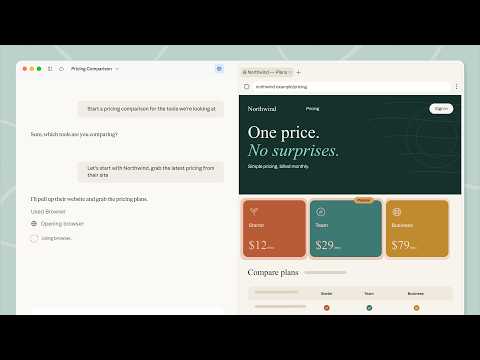
Anthropic is gradually merging chat and Cowork for Pro and Max accounts across web, desktop and mobile. The new experience can search the web, run code and return editable documents, spreadsheets or presentations without making the user choose a separate mode first. Accounts still seeing separate Chat and Cowork options have not received the rollout yet. Read Anthropic's rollout guide.
Source: Anthropic's public Cowork announcement, captured September 16, 2026. The screenshot shows the vendor's delegated supplier-comparison example, not a WhatAI test.
Sonnet 5.5 is the practical first choice for most defined work
Anthropic released Sonnet 5.5 on September 28 and positions it for well-scoped everyday tasks, bug fixes and polished documents. The company says it runs more than 30% faster than Sonnet 5 and keeps the same API list prices of $2 per million input tokens and $10 per million output tokens. Those are vendor measurements and developer prices, not a promise about subscription usage or the cost of your task.
Start with Sonnet 5.5 when the brief is clear and correction is easy. Move to Opus 5.5 when the job needs sustained judgment across ambiguous evidence, architecture or consequential decisions. Anthropic prices Opus 5.5 at $4 per million input tokens and $20 per million output tokens. A higher-priced model is useful only when it reduces the review and correction work enough to matter.
Define the output before delegating the process
For a supplier comparison, specify the exact product, region, quantities, date checked and evidence columns. Tell Claude to leave unavailable prices as unknown. Require source links and a short exceptions list, then verify a sample of the original pages. A polished table can still mix annual prices, exclude delivery or apply the wrong eligibility rule.
The same principle applies to code and files. Ask for a change plan, allowed files, tests and a summary of actions taken. If the task can browse or use connected apps, state which accounts and final actions are in scope. Website text and retrieved documents are inputs to inspect, not new authority.
WhatAI's practical starting point
Choose one recurring task with a result you already know how to check. Run it with Sonnet 5.5 using a fixed brief, then record briefing time, correction time and any missed evidence. Try Opus 5.5 only if the remaining failures require deeper judgment. The useful upgrade is not a benchmark win by itself. It is a dependable handoff that leaves enough evidence for a person to decide whether the work is finished.
Claude is Anthropic's AI workspace for long-context analysis, professional writing, research, coding and multi-step work. Sonnet 5.5 targets faster everyday tasks, while Opus 5.5 is positioned for more complex judgment.
What Claude is actually best at
Claude is worth considering for work that spans documents, detailed instructions and repeated revisions. Ask it to connect each conclusion to evidence, then inspect the original passages. Claude Code supports software implementation, while delegated tasks can return editable files and work through supported websites.
Where Claude falls short
Claude is not automatically the best option for live social conversation, the broadest consumer ecosystem or unlimited high-volume work. Usage limits can become noticeable during long sessions, and features may reach accounts gradually. Large context windows also do not remove the need to verify quotations, calculations, legal interpretation, files or code changes.
About Claude
Claude is Anthropic's AI workspace for document analysis, professional writing, research, coding and delegated knowledge work. Its current model choices include Sonnet 5.5 for faster everyday work, Opus 5.5 for complex judgment and Fable 5.1 for long-running agentic work, subject to plan and usage access. Projects preserve context, Claude Code works across software projects, and the unified Claude experience can move from a quick answer to a longer task in one conversation as rollout reaches eligible accounts. Check important claims, files and completed actions before relying on the result.
Use Cases
Key Features
- ✓ Sonnet 5.5, Opus 5.5 and Fable 5.1 model options, subject to plan and usage access
- ✓ Unified chat and Cowork experience rolling out gradually to eligible Pro and Max accounts
- ✓ Long-context document and file analysis
- ✓ Projects for persistent files, instructions and related conversations
- ✓ Artifacts and file creation for documents, code, charts and interactive outputs
- ✓ Claude Code for codebase-level software development
- ✓ Delegated tasks that can search the web, run code and create editable files
- ✓ Built-in browser and Claude in Chrome for supported web tasks
- ✓ Web search and Research workflows
- ✓ Memory across conversations where available
- ✓ Desktop, browser, iOS and Android access
- ✓ Connectors and integrations for Slack, Google Workspace, Microsoft 365, GitHub and development tools
Pricing
Free
$0
- • Limited chat, file analysis, web search and file creation
- • Sonnet and Haiku access; usage limits apply
- • Web, desktop and mobile access
Pro
$20/month or $200/year upfront (USD)
- • More usage, unlimited Projects and Research
- • Claude Code, Cowork, Design, Science and Microsoft 365
- • Additional model access; Fable uses usage credits
Max 5x
$100/month (USD)
- • 5x Pro usage per session
- • Higher output limits and priority access
- • Model-specific and weekly caps can still apply
Max 20x
$200/month (USD)
- • 20x Pro usage per session
- • For heavier recurring workloads
- • Not unlimited; monitor capacity and cost
Team
Standard $25/month or $20/month billed annually
- • USD per seat for 2 to 150 seats
- • Premium $125/month or $100/month billed annually
- • Shared administration, connectors and workplace integrations
Enterprise
$20/seat/month plus usage (USD)
- • Usage billed separately at API rates
- • Advanced access, audit, retention and spend controls
- • Confirm current terms and feature availability
Pricing varies by plan and region — see current pricing.
Plan features change — last updated: 2026-10-06.
Details
Tags
Claude Community Discussions
Explore community discussions. Ask and answer questions on Claude to grow and learn together.

Claude Showcase



WhatAI verdict on Claude
Claude — Frequently Asked Questions
What is Claude best used for?
Claude is best used for long-document analysis, careful writing and revision, research synthesis, complex reasoning, editable work files and software development across existing codebases.
Which Claude models are available?
Anthropic's late September 2026 line-up includes Sonnet 5.5 for faster everyday work, Opus 5.5 for complex open-ended work and Fable 5.1 for advanced long-running agents. Availability, allowance and the model picker depend on the plan, surface and account.
How should I choose a Claude plan?
Use Free to test representative writing and analysis tasks. Consider Pro when Projects, Research, Claude Code or delegated work are useful. Track actual usage before moving to Max. Team and Enterprise add organizational controls, and current Enterprise usage is billed separately from the seat fee.
Is Claude better than another assistant for long documents?
Test the same source pack and questions in both tools. Check omitted evidence, quotation accuracy, consistency and correction time. Claude is a strong candidate for this workflow, but a large context window does not establish that it will win on your documents.
What is Claude Code?
Claude Code is Anthropic's agentic coding tool. It can read a codebase, edit files, run commands and work with development tools through terminal, IDE, desktop, browser and supported integrations.
Does Claude have usage limits?
Yes. Limits vary by plan, model, task size, context length and demand. Paid plans use rolling session limits and can also have weekly or other caps. Eligible users may continue with usage credits billed at API rates.
Can Claude handle a task instead of only answering a question?
Anthropic is gradually merging chat and Cowork for eligible Pro and Max accounts. In the new experience, one conversation can answer quickly or carry out a longer task that searches the web, runs code and returns editable files. Other plans and accounts may still show separate modes.
Can Claude work with sensitive business information?
Anthropic offers Team and Enterprise controls for organizational use, but suitability depends on the workspace agreement, retention settings, security requirements and the user's own compliance obligations.
Sources & References
Try Claude
Visit the official website to get started with Claude today.
Visit Claude →