Numerous.ai Turns Rows Into AI Workflows
Bulk AI works when the sheet stays in charge
By WhatAI Editorial ·
Numerous.ai Turns Rows Into AI Workflows
The spreadsheet has survived every prediction of its death because it is not merely a calculator. It is the place where unfinished work becomes visible. Customer feedback arrives there. Product catalogues are cleaned there. Campaign ideas, research notes, supplier lists, survey responses, and operating reports are arranged into rows because rows give messy work a shape.
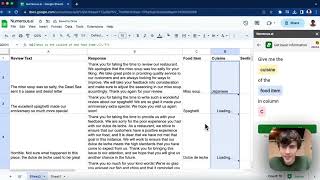
Numerous.ai takes that familiar structure and puts generative AI inside the cells. Instead of copying one item into ChatGPT, writing a prompt, copying the answer back, and repeating the process a hundred times, a user can write an AI function once and fill it down a column. The result is not a new spreadsheet application. It is a way to make an existing spreadsheet process capable of reading, classifying, extracting, rewriting, and generating text at scale.
That sounds simple because it is simple. The important question is whether the simplicity survives contact with real data. Numerous.ai is most useful when the work is repetitive, the desired output can be described clearly, and a human can review the results inside the same table. It is less convincing when the task needs deep analysis, live web research, deterministic calculations, strict data governance, or an autonomous workflow that should run without someone opening a sheet.
The Cell Is the Interface
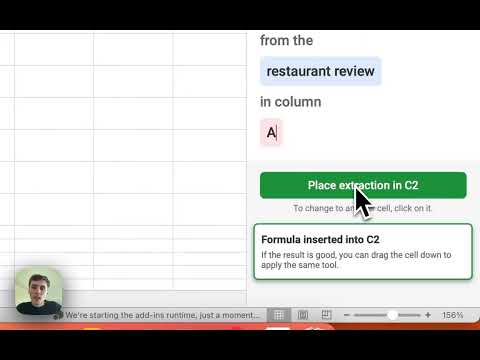
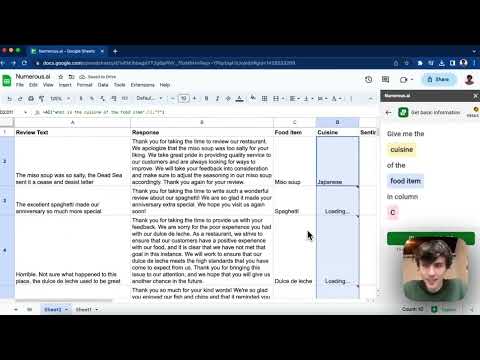
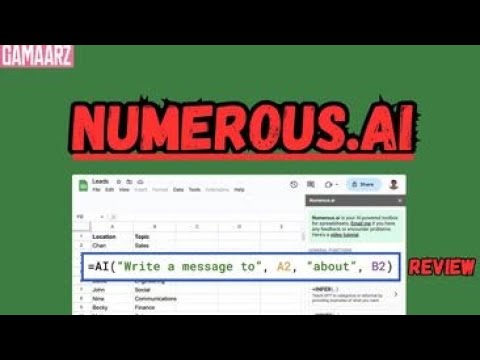
Numerous.ai works in Google Sheets and Microsoft Excel. Its central idea is the =AI() function, which can combine an instruction with the contents of other cells. A support team might ask it to summarize a message in A2. A marketer might classify a campaign keyword into an intent category. An ecommerce operator might extract a product material, rewrite a description, or label a review by sentiment. Once the first result looks right, the formula can be dragged down across the remaining rows.
This is different from asking a chatbot to analyse an uploaded workbook. A chat interface is good for an exploratory question about the whole file. A cell function is better when each row needs the same transformation and every answer needs to land beside its source. The spreadsheet remains the control surface. Inputs, prompts, outputs, exceptions, and reviewer notes can sit in neighbouring columns, which makes the process easier to inspect than a long conversation.
The Google Workspace listing also describes separate tools for writing text, inferring a pattern from examples, generating spreadsheet formulas from plain English, and explaining formulas. These are practical additions. Formula generation helps a person who knows the result they want but cannot remember the syntax for QUERY, REGEX, VLOOKUP, COUNTIF, or a nested condition. Formula explanation helps when a workbook arrives from a colleague with logic that nobody wants to reverse-engineer manually.
The distinction between an AI answer and a spreadsheet formula matters. If the task is arithmetic, filtering, lookup, aggregation, or another deterministic operation, the best output is often a normal spreadsheet formula. That formula recalculates predictably and can be audited. If the task involves meaning in unstructured text, such as identifying themes in feedback, an AI-generated answer may be appropriate. Numerous.ai can help with both, but users should not replace reliable spreadsheet logic with probabilistic text generation when a standard function will do the job better.
Bulk Work Is the Real Advantage
Numerous.ai is often described as ChatGPT for spreadsheets, but its real value is not access to a chat model. ChatGPT, Gemini, Copilot, and many other products can already answer a spreadsheet question. The advantage is repeatability. Numerous.ai turns one prompt into a column operation, and the table gives each input and output a stable address.
Consider 2,000 customer comments. A manager could paste them into a general chatbot in batches and ask for a summary, but that would compress the evidence. Numerous.ai can classify each comment by topic, assign a sentiment label, extract a named product, and produce a short summary in separate columns. The team can filter the outputs, inspect uncertain rows, count recurring categories, and trace every label back to the original comment.
The same pattern works for product catalogues, lead lists, survey responses, content inventories, support tickets, research notes, and marketplace listings. It also exposes bad instructions quickly. If the first ten rows produce inconsistent labels, the user can revise the prompt before spending tokens on the whole dataset. A spreadsheet is unusually good at showing variation, and variation is where AI quality problems become visible.
Numerous.ai says it caches long-term results and avoids duplicate queries. That can reduce unnecessary model use when the same inputs recur. It does not remove the need to design the sheet carefully. Users should preserve source data, avoid overwriting original columns, separate prompts from outputs, and add a review status. A simple layout with Source, Prompt Version, AI Output, Approved Output, and Reviewer Notes can turn an informal experiment into a process that another person can understand.
Prompt Design Becomes Data Design
People often blame an AI model when a spreadsheet classification drifts, but the problem frequently begins in the categories. A request such as "categorize this feedback" leaves too much undecided. What are the allowed categories? Can a row receive more than one? What happens when the evidence is weak? Should shipping complaints be grouped under Delivery, Operations, or Customer Experience? The model cannot apply a taxonomy that the team has not defined.
A better prompt supplies the allowed labels, a short definition for each, an output format, and a fallback such as Needs Review. Include a few representative examples when the boundary between categories is subtle. Ask for only the field required, not an explanation and a paragraph of commentary in every cell. The more structured the result, the easier it is to filter, validate, and use downstream.
Extraction needs the same discipline. If the task is to pull a company name, date, material, or product code from text, define what a missing value should look like. Do not let the model invent a plausible answer. Use a blank value or a fixed token such as NOT_FOUND when the source does not contain the information. Then filter those rows for human review.
For writing tasks, provide constraints that belong in columns. Tone, audience, length, product type, and prohibited claims can each be drawn from the row. This is more reliable than hiding every variable inside one enormous prompt. It also makes the workflow reusable: change the audience column and regenerate a small test sample instead of rewriting the entire instruction.
The Human Review Column
Numerous.ai can reduce manual repetition, but it cannot decide how much error a business can tolerate. A rough sentiment scan for an internal brainstorming session has a different risk profile from categorising complaints for regulatory reporting. Product descriptions have different consequences from financial formulas. The review process should match the harm caused by a wrong answer.
For low-risk ideation, sampling may be enough. Review the first rows, inspect a random set, and check outliers. For customer-facing content, sensitive classifications, or important operating data, review every generated value or use deterministic validation rules before approval. Never assume that a clean column means a correct column. AI is particularly capable of producing consistent-looking mistakes.
Spreadsheet checks can carry much of this burden. Use data validation to restrict categories, conditional formatting to flag unexpected outputs, formulas to detect blanks or duplicates, and counts to compare category distributions. Keep a confidence or review field where appropriate. If an AI output feeds another automation, add an explicit Approved value so unreviewed rows cannot move forward accidentally.
Financial work deserves special caution. Numerous.ai can explain a formula, draft one from plain English, or classify transaction descriptions, but a generated formula can contain a subtle range error while appearing completely reasonable. Test it against known examples. Check absolute and relative references before filling down. Reconcile totals independently. Do not allow a generated label or formula to become the only evidence behind a payment, forecast, tax position, or financial statement.
What the Pricing Really Buys
Numerous.ai's public site currently presents paid access rather than the free tiers listed in older directory records. The annual Personal offer is displayed at $10 per month, with 1,000 tokens, up to 500,000 characters of ChatGPT inputs and outputs, and 500 formula generations. The site advertises a seven-day introductory trial, although the exact trial wording has appeared inconsistently, so buyers should confirm the checkout terms before subscribing.
The team offer is displayed from $10 per person per month when billed annually. It includes a larger character allowance per person, use in Google Sheets and Excel, priority email support, and optional video onboarding. Larger requirements can be discussed through a custom plan. The public page also says unused tokens are retained after cancellation, but any team evaluating a significant workload should confirm how tokens, character limits, formula generation, users, and renewal billing apply to its specific account.
These limits matter because one "task" can spread across many cells. A prompt tested on five rows is cheap; filling it across 50,000 rows is a different workload. Character usage includes both input and output, so long source text and verbose prompts consume more capacity. Formula generation has its own stated allowance. Estimate from a representative sample before committing a full dataset.
The $10 headline is attractive, but it should be compared with the process it replaces. If Numerous.ai saves an analyst two hours of copying, classifying, or rewriting each month, the subscription can justify itself easily. If the team uses it only to generate an occasional formula, native AI features in Excel or Google Workspace, a general chatbot, or a free formula assistant may be sufficient. The value appears when repeated row-level work is already part of the job.
Privacy Starts With the Sheet
Installing a spreadsheet add-on is not the same as visiting a standalone chatbot. The Google Workspace Marketplace listing states that the app can view and manage spreadsheets where it is installed, display and run third-party content in prompts and sidebars, connect to an external service, and access basic account information. These permissions support the product, but they also mean an organization should understand what data may be sent for processing.
Numerous.ai's privacy policy says each AI request is transferred to OpenAI through its API. It says OpenAI does not use API data to train models and retains submitted data for 30 days for abuse monitoring. Numerous.ai says it stores the data explicitly passed into =AI, =WRITE, and =INFER functions in a Google Cloud database in the United States so results can be cached. It also says it does not access or store spreadsheet data that was not explicitly passed to those functions. The policy was last edited in April 2024, so organizations should verify that these terms still reflect the service they are buying.
Do not begin a trial with the most sensitive workbook available. Use synthetic or non-confidential data to test functionality. Determine whether customer data, employee information, credentials, health information, legal material, or regulated financial data is allowed to leave the existing environment. Confirm retention, deletion, location, subprocessors, contractual protections, and whether the available controls satisfy the organization's current requirements.
Access governance matters too. In a shared workbook, one person's formula can process data entered by someone else. Protect prompt columns, document approved use cases, and restrict who may install add-ons or spend team tokens. If a workflow becomes important, assign an owner who reviews permissions, billing, prompt changes, and output quality rather than treating the formula as invisible infrastructure.
Where Numerous.ai Fits Among Spreadsheet AI
Numerous.ai competes with two kinds of product. The first is another spreadsheet add-on, such as SheetAI or GPT for Sheets and Docs. These tools also bring model functions into cells, so the decision often comes down to supported functions, model quality, usage limits, team controls, support, and how reliably the add-on handles large fills.
The second is the native AI direction from Microsoft and Google. Copilot in Excel and Gemini in Google Sheets can understand more of the host application and may fit more naturally into an organization's existing subscription and governance. Native assistants are often better for conversational analysis, building tables, or making application-level changes. A focused add-on can still be better for a lightweight =AI() workflow that must run predictably across rows.
There is also a third alternative: use an automation platform, script, or API. That requires more setup but gives developers control over models, batching, retries, logging, costs, and downstream actions. Numerous.ai is strongest before that complexity is justified. It lets a non-developer prove that a repeated AI transformation is valuable while keeping inputs and outputs visible.
A Practical Evaluation
Choose one recurring dataset with 100 to 500 rows. Good candidates include feedback categorization, product attribute extraction, lead research cleanup, content repurposing, or formula explanation. Remove confidential information. Define the desired output and create a manually approved test set of at least 30 diverse rows, including ambiguous and messy examples.
Install Numerous.ai in Google Sheets or Excel, then build the prompt against ten rows. Measure accuracy against the approved set. Record the failure types rather than merely counting wrong answers. Did the model invent missing information, ignore allowed categories, produce inconsistent formatting, or misunderstand industry language? Revise the taxonomy and prompt before changing models or filling the entire column.
Next, test scale. Run a larger batch and watch latency, errors, token use, character use, and formula behaviour. Change one source cell and confirm whether the result updates as expected. Duplicate an input and observe caching. Share the workbook with another authorised user and verify that permissions, formulas, and plan access behave as the team expects.
Finally, test recovery. Keep an untouched source tab. Copy approved outputs to values when the workflow requires a stable result. Document the prompt version. Decide what should happen when a cell errors, returns an unexpected label, or consumes more usage than expected. A useful pilot ends with a repeatable procedure and an estimate of cost per hundred or thousand rows.
The WhatAI Verdict
Numerous.ai does not try to replace the spreadsheet. That restraint is its strongest quality. It gives Google Sheets and Excel users a direct way to run AI across rows, generate or explain formulas, classify text, extract fields, and create repeated content without moving the work into a separate chat window.
The best user already has a structured, repetitive spreadsheet task and can describe what a correct output looks like. Numerous.ai can remove the copying and make experimentation much faster. The weakest fit is an occasional formula question, an unstructured research problem, a high-risk dataset without governance, or a workflow that should become a fully monitored application.
Used well, Numerous.ai turns a spreadsheet from a passive list into a transparent AI workbench. Used carelessly, it can fill a thousand cells with plausible errors just as efficiently. The difference is not the cleverness of the prompt alone. It is the quality of the categories, the design of the sheet, the review column, and the decision to keep a human responsible for what the generated data is allowed to do.
Numerous.ai brings generative AI into Google Sheets and Microsoft Excel through cell functions and add-in tools. It is designed for repeated, row-level work: classify text, extract fields, summarize feedback, generate content, write spreadsheet formulas, or explain existing formulas without moving data through a separate chat window.
What Numerous.ai Does in Spreadsheets
The central workflow uses an AI function inside a cell, with prompts that can reference values elsewhere in the row. After testing the first outputs, users can fill the function down a column to process a larger dataset. Numerous.ai also supports formula generation, formula explanation, writing, inference from examples, text cleaning, classification, summarization, and extraction. Its strongest use cases have consistent inputs, a clearly defined output, and a review step.
Is Numerous.ai Worth It?
Numerous.ai is worth considering when repeated spreadsheet work already consumes meaningful time. The value is not merely access to an AI model; it is the ability to keep source data, prompts, outputs, and human review in one visible table. It is less compelling for occasional formula questions, deep statistical analysis, highly sensitive data without governance, or workflows that require a monitored application rather than an open workbook.
About Numerous.ai
Numerous.ai is an AI add-on for Google Sheets and Microsoft Excel that runs generative AI tasks directly inside spreadsheets. Users can call AI from a cell, reference other cells in a prompt, fill the function down a column, generate or explain spreadsheet formulas, infer patterns from examples, classify and summarize text, extract structured fields, clean data, and create repeated content. It is designed for visible, row-by-row bulk work rather than autonomous application workflows. The add-on does not require users to supply an API key, and paid plans use token, character, and formula-generation allowances.
Use Cases
Key Features
- ✓ AI functions that run directly inside spreadsheet cells
- ✓ Prompts can reference values from neighbouring cells
- ✓ Fill-down processing for repeated row-level tasks
- ✓ Plain-English generation of spreadsheet formulas
- ✓ Formula explanations in natural language
- ✓ Text classification, summarization, extraction, and rewriting
- ✓ Pattern inference from examples
- ✓ Long-term result caching for duplicate queries
- ✓ Google Sheets and Microsoft Excel add-ins
- ✓ No separate model API key required
Pricing
Trial
7 days; verify checkout terms
- • Test the spreadsheet add-on
- • Trial wording may vary by checkout
Personal
$10/month billed annually
- • 1,000 tokens
- • 500,000 input and output characters
- • 500 formula generations
- • Designed for small projects
Team
From $10/user/month annually
- • One million characters per person
- • Google Sheets and Excel access
- • Priority email support
- • Optional video onboarding
Custom
Contact sales
- • Higher-volume requirements
- • Custom plan discussion
Pricing varies by plan and region — see current pricing.
Plan features change — last updated: 2026-08-24.
Details
Tags
Numerous.ai Community Discussions
Explore community discussions. Ask and answer questions on Numerous.ai to grow and learn together.

Numerous.ai Showcase

Numerous.ai — Frequently Asked Questions
What is Numerous.ai?
Numerous.ai is an add-on for Google Sheets and Microsoft Excel that runs AI prompts, writing, classification, extraction, and formula tools inside a spreadsheet.
How does the Numerous.ai AI function work?
Add an AI function to a cell, write an instruction, and reference source cells as inputs. After reviewing the first results, fill the formula down to repeat the task across more rows.
Does Numerous.ai work with both Excel and Google Sheets?
Yes. Numerous.ai provides add-ins for Google Sheets and Microsoft Excel. Microsoft's listing says its Excel add-in works with Excel 2016 or later on Windows and Mac, plus Excel on the web.
Does Numerous.ai require an OpenAI API key?
No. Numerous.ai states that users can install the add-on and begin without supplying a separate model API key.
What can Numerous.ai do with spreadsheet data?
It can classify, summarize, extract, rewrite, and clean text; generate repeated content; infer patterns from examples; and generate or explain spreadsheet formulas.
Is Numerous.ai free?
The add-on can be installed from the Google Workspace Marketplace, but the current Numerous.ai site presents a trial followed by paid access. Its annual Personal price is displayed at $10 per month. Confirm current trial terms at checkout.
Is Numerous.ai safe for sensitive data?
Treat it as a third-party spreadsheet add-on and review its current permissions, privacy policy, retention terms, and organizational requirements before processing confidential or regulated data.
Should AI-generated spreadsheet formulas be reviewed?
Yes. Test generated formulas on known examples, inspect cell ranges and references, and independently reconcile important totals before relying on them.
Sources & References
Try Numerous.ai
Visit the official website to get started with Numerous.ai today.
Visit Numerous.ai →