Landbot Makes Hybrid AI the Product
Use AI where flexibility earns its place
By WhatAI Editorial ·
Landbot Is Becoming a Hybrid AI Conversion Builder
The strongest way to understand Landbot in 2026 is not as a chatbot that gained an AI feature. It is as a visual conversation and automation platform that now lets teams decide, step by step, where they want deterministic logic and where they want an AI agent to take over.
That distinction matters because customer-facing AI has a control problem. Pure rule-based bots are predictable but can feel rigid when a visitor asks something unexpected. Pure generative agents are flexible but can wander, miss required fields, invent details, or fail to hand a conversation to the right next step. Landbot's current product direction is built around combining both approaches inside the same customer journey.
The practical product is therefore not one AI agent. It is the boundary between AI and rules.
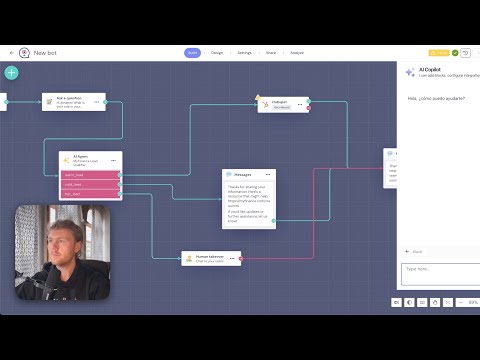
A business can start a conversation with structured buttons, detect intent with an AI Agent, answer a question from a knowledge base, collect a name or budget into a field, return to a deterministic qualification path, update a CRM, and hand the conversation to a human when the situation becomes ambiguous. That architecture is more interesting than another generic chatbot because it gives the builder a place to decide what should be flexible and what should never be improvised.
Landbot 4 made that direction explicit. The redesign introduced an AI Copilot inside the builder, a native AI Agent Block, interactive components inside AI conversations, a native OpenAI block, and a two-way n8n integration. The older idea of a chatbot builder remains, but the platform now looks increasingly like a no-code system for customer-facing agents on websites, WhatsApp, Messenger, and API-based experiences.
What changed is not that Landbot can generate text. Many products can generate text. The useful change is that AI can now sit inside a flow that still exposes fields, branches, outputs, handoffs, integrations, and run behavior to the operator.
That is where Landbot can earn a place.
Start with the job, not the bot
A common failure mode with conversational software is starting with the sentence, "We need a chatbot." That is not a business requirement. It is a format.
The better starting point is a repeated customer interaction that has a measurable outcome. Examples include qualifying inbound leads, routing support questions, booking appointments, collecting structured intake data, recovering abandoned interest, or moving a WhatsApp conversation into a CRM record with enough context for a salesperson to act.
Landbot is strongest when the conversation has both open-ended and structured parts. A lead may describe a problem in their own words, but the business still needs a valid email, a budget range, a product category, a territory, and a routing decision. An AI Agent can interpret the free-text part while Landbot's fields, conditions, outputs, and integrations keep the operational part structured.
That is a better use of AI than allowing the model to own the entire journey.
The current AI Agent Block can collect and store information, consult a knowledge base, return data into the surrounding chatbot flow, render interactive components, and exit through defined outputs. Builders can create an agent from a natural-language description, edit its instructions with AI, select the model available in the configuration, and define how it should use context and stored fields.
The knowledge-base layer is useful but should be treated as a retrieval system, not magic training. Landbot currently supports text, uploaded documents, and URLs. The documentation says a URL source can be refreshed on a schedule and that the knowledge base is text-only. Images and graphics inside a source are not understood as knowledge. Landbot also documents a roughly 200,000-character ceiling for direct text or scraped website HTML in the current setup.
That means content quality still matters. A messy help center with duplicated prices, conflicting policies, and vague product descriptions will produce a messy knowledge base. AI does not remove the information architecture problem. It makes poor information architecture easier to expose to customers.
Landbot's own guidance reflects this. It recommends clear question-and-answer structures, independent sections, consistent formatting, direct language, lists instead of tables where possible, and frequent testing. Those are not minor setup details. They are part of the reliability work.
The AI Agent should be tested as a system
Landbot's help documentation is unusually explicit that AI Agents can fail in predictable ways. An agent may not collect a field correctly, may not use the knowledge base as intended, may miss an output condition, or may become confused by weak instructions.
That is useful honesty because the buyer should not evaluate the product from a smooth demo conversation. The real test is whether the agent still behaves correctly after hundreds of varied customer messages.
For a production build, WhatAI would test at least five classes of conversation.
First, the happy path: the customer says exactly what the design expects.
Second, the ambiguous path: the customer provides partial or conflicting information.
Third, the adversarial path: the customer asks the agent to ignore its instructions, disclose internal content, or perform something outside scope.
Fourth, the recovery path: an integration fails, a field cannot be validated, or the AI service returns an error.
Fifth, the handoff path: the conversation requires a human and the full context needs to reach that person without making the customer repeat everything.
A conversational system is only useful when those paths work, not when the first scripted example does.
Pricing needs to be read as multiple meters
Landbot's headline plan price does not describe the full operating cost.
The current public pricing structure starts with a Free plan, then Starter at 40 euros per month, Professional at 100 euros per month, Professional with WhatsApp at 200 euros per month, and Business from 400 euros per month. Annual billing is displayed at a 20 percent lower monthly equivalent for the paid self-service tiers.
The included usage is different by tier. Starter currently includes 500 standard chats and 100 AI chats. Professional includes 2,500 standard chats and 300 AI chats. The WhatsApp version of Professional includes 2,500 standard chats, 500 AI chats, and a WhatsApp number with a separate messaging allowance. Business uses custom volume and currently starts with a larger AI allowance in the public comparison.
The important thing is that regular chats and AI chats are not the same meter. Landbot currently lists extra regular chats at 0.05 euros each, typically represented as 25 euros per 500 extra chats, while extra AI chats are 0.10 euros each. WhatsApp adds another layer because Meta's channel pricing applies on top of the Landbot platform economics.
So the right comparison metric is not cost per seat or cost per bot. It is cost per useful outcome.
If a 10-message interaction produces one qualified appointment, compare the total cost of acquiring that appointment. If an AI support flow resolves a ticket, compare cost per resolved issue. If a WhatsApp journey generates a sale, compare cost per incremental conversion. Those metrics survive changes in chat allowances and plan packaging.
This is particularly important in September 2026 because WhatsApp pricing is changing again.
Landbot published a September 4 warning that Meta will begin charging for WhatsApp Business API service messages on October 1, 2026. Service replies inside the 24-hour customer-service window had been free under the previous structure. From October, those replies become billable by Meta, with rates that vary by country. Utility templates also lose temporary free treatment.
That change makes long conversational flows more expensive and gives Landbot's own "WhatsApp as transport, not the product" argument more weight. A team that pushes every discovery question, qualification step, support clarification, and low-intent interaction into WhatsApp is now exposing more of its funnel to a per-message tariff controlled by another platform.
For WhatAI, the useful architecture is to keep identity, logic, CRM data, qualification rules, and reusable conversation design in the business's own system, then use WhatsApp where its reach and response rate justify the channel cost.
There is also a provider constraint to understand. A WhatsApp Business number can only be active with one provider at a time. Switching providers therefore involves unlinking and migration rather than quietly running two providers in parallel on the same number. That is channel-level switching friction, not a Landbot-specific defect, but it belongs in the buying decision.
Current public pricing pages also deserve a small caution. Landbot has multiple live pricing surfaces, and some sections still expose older plan wording such as AI Assistants or older WhatsApp packaging. Newer 2026 content emphasizes AI Agents and a simpler Professional plus WhatsApp structure. The live checkout and written commercial terms should therefore be treated as the purchase-level source of truth.
The same is true for contract language around WhatsApp. One Landbot pricing surface still says WhatsApp plans are annual contracts, while newer pricing FAQs describe monthly plans as month-to-month and annual billing as optional. That is exactly the sort of inconsistency a WhatAI tool page should surface rather than silently resolve. A buyer planning a WhatsApp deployment should confirm the commitment term before purchase.
The privacy picture also needs careful wording
Landbot's current pricing FAQ says customer chats are not used to train models and are not sold to third parties. The company also presents itself as a European GDPR-compliant platform and documents SOC 2 controls and a DPA through its Trust Center.
However, Landbot's general Terms and Conditions still contain an older AI-services clause saying anonymized end-user data entered into certain named services can be used for training and performance improvement through OpenAI. Those named services include Build-it-for-me, FAQs AI Assistant, Lead Gen AI Assistant, and Appointment Scheduling Assistant.
This matters because Landbot's help center separately says the old FAQ and Lead Gen AI Assistants are being deprecated in favor of the newer AI Agent Block. The current product messaging and the older legal clause are therefore not perfectly synchronized.
The safe WhatAI interpretation is not to claim that Landbot secretly trains on current AI Agent chats. The current pricing FAQ says the opposite. The useful conclusion is that organizations handling sensitive or regulated customer data should verify the current DPA, subprocessor list, AI-specific contract language, and exact feature being used rather than relying on one marketing sentence or one older legal clause.
This is especially important because a chatbot often collects precisely the information a company cares most about: identity, intent, contact details, product interest, support history, and sometimes sensitive customer context.
Landbot's Trust Center is therefore more relevant than a generic security badge. It centralizes compliance information, controls, subprocessors, documentation, and security resources. Enterprise buyers should review the actual data path: where the bot is hosted, what model processes the AI conversation, what connected CRM receives the data, what WhatsApp or Meta systems process the message, what retention rules apply, and which teammates can access the inbox.
Affiliate economics are unusually strong
Landbot has an active PartnerStack-managed affiliate program that is attractive for WhatAI because the product has recurring subscription revenue and a clear educational buying journey.
The current official affiliate page advertises 20 percent recurring commission on all plans for up to two years, a 90-day referral cookie, and monthly payouts through PartnerStack to Stripe or PayPal. The page explicitly includes agencies and people referring clients, which fits the kind of audience that might use WhatAI to compare chatbot and agent platforms.
The correct WhatAI implementation is still to leave the final affiliateLink empty until WhatAI receives its approved tracking URL. The affiliateManagerUrl can point to Landbot's official affiliate page, and the editorial should disclose the commercial relationship when that link is eventually activated.
Who should choose Landbot
Landbot is a strong fit for marketing, sales, operations, and support teams that want to own a customer-facing conversation without making every change a developer ticket.
It is particularly compelling when the workflow already contains a mixture of free-text conversation and fixed business rules. Lead qualification is the clearest example. A visitor can explain what they need naturally, while the system still collects required data, scores the lead, checks a condition, books a meeting, updates HubSpot or another CRM, and transfers the conversation when appropriate.
It also makes sense for teams that want the same logic to run across a website and WhatsApp without designing every customer journey from scratch inside each channel.
Agencies can benefit when they repeatedly build conversational lead-generation or support systems for clients. The visual builder, templates, fields, handoff, and integration blocks make the work explainable to non-developers after delivery.
Landbot is less compelling when the requirement is primarily a conventional help desk with deep ticketing, workforce management, and omnichannel support operations. Tidio, Intercom-style systems, or a dedicated contact-center platform may be a better fit depending on the use case.
It is also not the obvious choice for a team that wants a highly autonomous general-purpose agent with broad tool use and minimal visual flow design. Products such as MindStudio or developer frameworks can offer more freedom when customer chat is only one interface among many.
And if the only job is Instagram or social-DM marketing automation, Manychat can be the more direct specialist.
The decision therefore comes down to control.
Landbot should not win because it says AI Agent on the homepage. It should win when the team can identify the exact moments where AI improves the conversation, the exact moments where deterministic logic protects the business process, and the exact handoff where a human should take over.
That is the product's real edge in 2026.
The best Landbot build is not the one with the most AI. It is the one where the user cannot tell which parts were flexible and which parts were locked down, because the conversation feels natural while the business process remains reliable.
Know what is available. Use only what earns a place in the workflow.
Landbot combines a visual chatbot builder with AI Agents, knowledge bases, structured fields, integrations and human handoff. Teams can qualify leads, answer questions, book meetings and automate customer conversations across websites, WhatsApp, Messenger and API-based experiences.
Landbot Pricing, AI Chats and WhatsApp Costs
Landbot currently starts free, with Starter at €40 monthly, Professional at €100, Professional with WhatsApp at €200 and Business from €400. Standard chats, AI chats, seats and WhatsApp messaging can use separate meters, so total cost should be compared against useful outcomes such as qualified leads or resolved support cases.
Is Landbot the Right AI Agent Builder?
Landbot is strongest when a customer journey needs both natural-language flexibility and fixed business rules. It is a weaker fit when the requirement is a deep help desk, a social-DM specialist, or a highly autonomous general-purpose agent with little need for visual flow control.
About Landbot
Landbot is a no-code platform for building AI agents and structured chatbots across websites, WhatsApp, Messenger and API experiences. Its visual builder combines AI conversations, knowledge bases, fields, deterministic flow logic, integrations, human handoff and messaging channels so teams can automate lead qualification, support, bookings and customer journeys without making every interaction fully generative.
Use Cases
Key Features
- ✓ Visual no-code conversation and automation builder
- ✓ AI Agent Block for natural-language conversations
- ✓ AI Copilot for building and troubleshooting flows
- ✓ Hybrid AI with rule-based steps and AI inside one journey
- ✓ Interactive components inside AI conversations
- ✓ Knowledge bases from text, documents and website URLs
- ✓ Scheduled refresh for website knowledge sources
- ✓ Structured field capture and generated data from chats
- ✓ Defined outputs from AI back into rule-based flows
- ✓ Human Takeover and shared team inbox
- ✓ Website, Messenger, WhatsApp and API channels
- ✓ WhatsApp opt-in tools and campaign workflows
- ✓ HubSpot, Airtable, Google Sheets and Calendly integrations
- ✓ Native n8n and OpenAI integration options
- ✓ Webhooks, API access and custom code on higher tiers
- ✓ A/B testing, lead scoring and flow analytics
- ✓ Agent Studio managed AI-agent services for larger teams
Pricing
Free
€0/month
- • 100 chats/month
- • 1 seat
- • Full visual builder and templates
- • No included AI chats
- • Try WhatsApp with a Landbot test number
Starter
€40 monthly or €32 annual
- • 500 chats/month
- • 100 AI chats/month
- • 2 seats
- • AI Agents
- • Conditional logic and A/B testing
- • Basic integrations
- • 14-day trial
Professional
€100 monthly or €80 annual
- • 2,500 chats/month
- • 300 AI chats/month
- • 3 seats
- • No Landbot branding
- • HubSpot, Airtable and webhooks
- • API chat
- • Live chat support
Professional WhatsApp
€200 monthly or €160 annual
- • 2,500 web and Messenger chats
- • 500 AI chats/month
- • 3 seats
- • 1 WhatsApp Business number
- • 10,000 service messages shown on current pricing
- • WhatsApp opt-in tools and campaigns
- • Meta fees can apply
Business
From €400/month
- • Custom standard chat volume
- • Larger or custom AI volume
- • From 5 seats
- • WhatsApp included
- • Dedicated support
- • Uptime SLA and security review
- • Agent Studio or managed services options
Pricing varies by plan and region — see current pricing.
Plan features change — last updated: 2026-09-07.
Details
Tags
Landbot — Frequently Asked Questions
What is Landbot?
Landbot is a no-code platform for building customer-facing chatbots and AI agents for websites, WhatsApp, Messenger and API experiences. It combines visual flows, AI Agent blocks, structured fields, integrations and human handoff.
Does Landbot have AI agents?
Yes. Landbot 4 includes a native AI Agent Block that can answer from a knowledge base, collect and store information, use instructions, return through defined outputs and work inside rule-based chatbot flows.
How much does Landbot cost in 2026?
Landbot currently lists Free at €0, Starter at €40 per month, Professional at €100 per month, Professional with WhatsApp at €200 per month and Business from €400 per month. Annual billing is displayed at lower monthly equivalents. Regional USD pricing is also available.
What is an AI chat in Landbot?
An AI chat is a conversation handled all or partly by a Landbot AI Agent. It is metered separately from standard rule-based chats. Current paid plans include an AI-chat allowance and extra AI chats are listed at €0.10 or $0.10 each on the public pricing table.
Can Landbot be used on WhatsApp?
Yes. Landbot supports WhatsApp Business automation, a WhatsApp Business number on the relevant plan, opt-in tools, campaigns, human handoff and AI-agent flows. Meta messaging fees and platform rules also apply.
Is WhatsApp included in Landbot Professional?
Landbot currently shows a Professional WhatsApp configuration at €200 monthly or €160 monthly equivalent on annual billing. Another pricing surface describes this as Professional plus a €100 per month WhatsApp add-on. Verify the live checkout before purchase.
Does Landbot include human handoff?
Yes. Human Takeover and a shared inbox are core parts of the platform. Builders can define when an automated flow or AI Agent should transfer the conversation to a person.
What can Landbot AI Agents use as a knowledge base?
Current documentation supports pasted text, uploaded text documents and website URLs. URL sources can be refreshed on a schedule. Knowledge-base retrieval is text-only, so images and graphics are not treated as knowledge.
Does Landbot use chats to train AI models?
Landbot's current pricing FAQ says customer chats are not used to train models. Its general Terms still contain an older clause for named legacy AI-assistant services that allowed anonymized end-user data to be used for training and improvement. Organizations with sensitive data should verify the current DPA and AI-specific terms for the exact feature they use.
Does Landbot have an affiliate program?
Yes. Landbot currently advertises a PartnerStack-managed affiliate program paying 20% recurring commission on qualifying subscriptions for up to two years, with a 90-day cookie and monthly payouts.
Sources & References
- Official Landbot website ↗
- Current Landbot pricing and plan comparison ↗
- Landbot 2026 pricing guide ↗
- Introducing Landbot 4 and AI Agents ↗
- Landbot AI Agent Block documentation ↗
- Landbot AI Agent setup best practices ↗
- Landbot AI Agent knowledge-base guidance ↗
- Capture and use data with Landbot AI Agents ↗
- Landbot migration from legacy AI Assistants to AI Agents ↗
- Landbot 2026 website chatbot and AI Agent guide ↗
- Landbot AI lead-qualification workflow guide ↗
- Landbot 2026 chatbot versus AI Agent explanation ↗
- Landbot September 2026 WhatsApp pricing-change analysis ↗
- Landbot August 2026 WhatsApp chatbot cost guide ↗
- Official Landbot WhatsApp automation page ↗
- Landbot Terms and Conditions ↗
- Landbot Trust Center overview ↗
- Landbot Trust Center ↗
- Official Landbot affiliate program ↗
- Landbot affiliate FAQ and tracking details ↗
- G2 Landbot user reviews ↗
- G2 Landbot pricing snapshot ↗
- WotNot Landbot Review 2026 ↗
- Landbot Academy ↗
- Landbot developer docs for AI agents ↗
- Landbot AI-agent app developer cookbook ↗
- Official Landbot 4 product launch demo ↗
- Official Landbot AI intent-detection tutorial ↗
- Landbot full guide 2026 ↗
- Official Landbot WhatsApp chatbot getting-started video ↗
Try Landbot
Visit the official website to get started with Landbot today.
Visit Landbot →