Mem is becoming the agent inside your notes
A familiar workspace now carries task tracking, routines, connections and a much bigger promise.
By WhatAI Editorial Team ·
Mem has changed its center of gravity
The old shorthand for Mem was an AI second brain: a place where notes could organize themselves and resurface at useful moments. That description still catches part of the product, but it now misses the larger bet. Mem presents the product as an AI chief of staff built from two connected parts. Workspace holds the visible record of notes, meetings, ideas and research. Mem Agent reads that context, builds a changing picture of tasks and projects, and tries to help at moments when follow-through matters.
That is more than a new slogan. The current plans meter messages, new notes, task and project tracking, Voice Mode, routines and external connections. The pricing model tells us what Mem believes the product is becoming: not simply a notebook with an AI chat box, but a personal operating layer that watches a growing body of context and can act on scheduled or connected work. The notebook remains important because it gives the agent a memory users can inspect and edit. The agent is the new center of attention because it is meant to turn that memory into momentum.
The notebook is still the memory
Mem has not abandoned writing in pursuit of agent theater. Notes remain the durable objects in the system, and that choice is one of its clearest strengths. Important context does not have to disappear into an opaque conversation history. A meeting summary, research clip, project decision or half-formed idea can live as a note that a person can open, correct, share and place in more than one Collection.
Collections provide flexible structure without forcing every note into a single folder. Mem says a note can belong to multiple Collections, while Auto-organize can suggest an existing home or create a new one. Shared Collections extend that model to collaborators. For teams that want a lightweight shared memory rather than a highly structured wiki, this can feel natural. The tradeoff is equally important: people who need strict databases, relational fields, permissions architecture or elaborate publishing controls may find that Mem is intentionally less rigid than a tool such as Notion.
Search and rediscovery are designed for imperfect memory
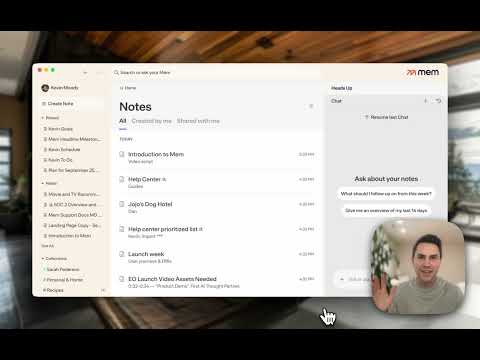
A useful knowledge tool should work when you cannot remember the title you gave something. Mem approaches retrieval in layers. Typeahead helps when the title is known. Full results add keyword matching and filters. Deep Search looks for semantic matches when the user can only describe the idea. Mem Chat goes further by answering, summarizing and drafting across the workspace, while allowing a person to narrow the context to selected notes or Collections.
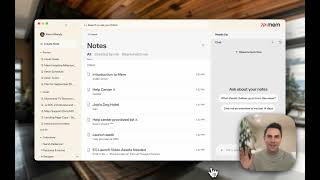
Heads Up handles a different kind of retrieval. Instead of waiting for a query, it surfaces related notes beside the note being viewed or written. Mem describes this as a real-time context panel that can recognize people, customers, topics and projects. In practice, the value depends on the quality and relevance of what it surfaces. When it works, the appeal is obvious: an old decision or earlier conversation can appear while the related work is already open. When it misses, the sidebar is only another stream to ignore. Buyers should judge this feature with their own note corpus, not a tidy demonstration workspace.
Capture has become a system rather than a button
Mem now offers several routes into the workspace. A person can type a note, use Push-to-Remember from a Mac or Windows shortcut, record with Voice Mode, clip a page in Chrome, share content from another app, or email material to save@mem.ai. Calendar connections can place meeting context beside notes, and the current calendar page lists Google Calendar and Microsoft Outlook support. The web clipper can turn a page or selected passage into a note and, according to Mem, summarize and organize the result.
Voice Mode is especially central to the new direction. Mem says it can capture a meeting or spoken thought, produce audio and a transcript, and transform the result into structured notes. The desktop recorder works locally on the device rather than joining a call as a visible participant. That removes the awkward meeting bot from the attendee list, but it does not remove the responsibility to obtain consent. Recording laws and workplace policies vary, and a discreet recorder can make disclosure more important, not less.
The chief of staff idea begins with follow-through
The most consequential addition is task and project tracking. Mem says Agent reviews notes that are created or edited, detects tasks and projects, and maintains a picture of open work. The free plan already includes a limited version of this. Pro adds Custom Routines and Connections, giving Mem scheduled background work and access to selected external sources. A routine might prepare a briefing, research a topic, create or organize notes, or send a reminder. A connection can supply context from a service such as Gmail, Slack or Todoist.
This is where Mem separates itself from an ordinary note assistant. A conventional AI feature waits inside the editor until the user asks for a summary. Mem wants the agent to notice an obligation, retain the surrounding context and return when action is useful. That promise should be evaluated carefully. Detection is not the same as reliable task management, and proactive help can become noise if priorities are inferred poorly. The best fit is likely someone who already records decisions and commitments in Mem and wants an intelligent layer over that behavior. It is a weaker fit for a team that needs deterministic assignments, dependencies, service levels and audit-ready workflows.
Pricing now follows capacity
Mem starts with a free plan and then climbs through Plus at $9 per month, Pro at $29, and higher-capacity Pro packages at $49, $99, $149 and $199 per month. The plans are not simple storage upgrades. They increase monthly messages, new notes, the number of notes reviewed for task and project tracking, open work tracked, Voice Mode hours, routines and connections. Pro is the first listed plan with a Custom Routine and a Connection. Mem also lists extra usage units at $50 per month for additional capacity.
This creates a more complex buying decision than the old free-versus-Pro comparison. People should estimate how often they will speak to Mem, how many notes they create, how much meeting audio they capture and whether background routines are genuinely useful. A $9 Plus subscription can suit a larger personal notebook, but it does not include the routine and connection allowances shown for Pro. High-capacity tiers can become expensive quickly, so they make the most sense when Mem is replacing real coordination effort rather than serving as an occasional search tool. Mem also documents a Teams plan through direct inquiry, so organizations should verify pricing, administration and support terms with the vendor.
The limits are unusually legible
One encouraging part of the current pricing page is that it names the units. A message can include a push-to-talk request, a floating-chat message, or a message sent through an external channel. A new note is counted when it is created during the month. Task and project tracking has both a review allowance and a cap on open tasks and active projects. Voice Mode is measured in hours. Routines have both active counts and execution allowances.
Clear units do not automatically make usage easy to predict. A busy meeting month may consume audio capacity faster than a quiet one. A person who captures many small notes may hit a creation limit even if storage is not a concern. Agent behavior can also generate value unevenly: one well-timed briefing might matter more than dozens of chat exchanges. The sensible trial question is not whether the largest quota looks generous. It is which unit becomes the constraint in an authentic week of work.
Chat is useful because it can change the workspace
Mem Chat can answer questions about notes, summarize a period of work, create drafts, suggest Collections and edit an open note. When a note is already open, Chat can carry that note into the conversation as explicit context. Users can also attach more notes or Collections, which is a practical way to limit a broad workspace query. Pro users can choose among multiple language models at the start of a conversation, according to the help center, though the selected model cannot be changed mid-conversation.
The important distinction is that Chat is not only a read-only answer surface. It can create or update notes and apply organization. That can reduce the gap between asking for a plan and saving the plan where future work can find it. It also raises the cost of a mistaken instruction. Version history helps, but people should still review edits, generated summaries and inferred priorities before treating them as the record. Mem is strongest when AI is allowed to prepare and organize work while a person remains responsible for the final meaning.
Migration is possible but not universal
Mem supports importing Markdown and plain-text files on Mac, Windows and the web. The help center recommends batches of roughly 1,000 files and says other file types and attachments are not imported directly. That is a workable route for text-heavy libraries from tools that export clean Markdown. It is less complete for a system full of embedded files, databases, drawings or application-specific metadata. Anyone planning a large migration should test a representative batch and inspect titles, links, formatting, attachments and Collection strategy before moving the full archive.
The product also offers an API and a Zapier connection. Mem describes the Mem It endpoint as the fastest way to send content into the workspace, while its Zapier documentation covers capture flows from meeting tools, Slack, Google Drive, task managers and forms. These routes make Mem easier to feed, but they also deserve information-hygiene rules. A second brain becomes less useful when every automated source pours in without curation. Start with the sources whose context is repeatedly valuable, then expand only when search and Agent behavior remain coherent.
Platform gaps still shape the fit
Mem is available on the web, Mac, Windows and iOS, with offline operation and syncing described in the help center. Android is not currently available, and Mem says it has no timeline to share. Official support is centered on English across features such as Voice Mode, Deep Search and Chat; other languages may work but are not officially supported. The help center also says account login currently requires a Google account.
These are not footnotes for every buyer. An Android-first user should treat the missing native app as a central limitation. A multilingual team should test transcription, search and generation with its actual languages. An organization with identity requirements should confirm whether the current login and team administration model fits policy. Mem feels personal and fluid at its best, but enterprise adoption often turns on controls that are less visible in a product tour.
Privacy deserves a deliberate reading
Mem revised its privacy policy on August 13, 2026. The policy says Mem does not sell collected information, does not use it to show third-party advertising, and does not use personal information, notes or third-party connected data to train generalized AI or machine-learning models. It also explains that Connected Services can provide messages, files, documents, events, contacts, tasks and related metadata within the permissions a user grants. Access can be revoked by disconnecting the service.
Those statements are meaningful, but they are not a substitute for governance. Notes can contain client material, strategy, personal identifiers and meeting conversations. Teams should review the full policy, the security page and the current Trust Center, then decide which material belongs in the system. They should also define consent for recordings, sharing rules for Shared Collections, connection permissions, retention expectations and a process for deleting an account or departing employee data. Mem says it uses Google Cloud and describes organizational and technical safeguards, while also acknowledging that no electronic system can be guaranteed completely secure.
Who should put Mem at the center
Mem is most compelling for founders, consultants, executives, researchers and creators whose work is already carried by notes, meetings and recurring follow-through. It suits people who want to capture with low friction, find material by meaning, and let an agent assemble context without building a meticulous database first. The current free plan makes it possible to see whether this style of working feels natural before paying. Pro becomes the meaningful threshold when routines and connected sources are part of the goal.
It is less convincing for people who primarily want a conventional document suite, an offline-first local file system, a mature Android experience or a rigorous project-management platform. It may also be too opinionated for users who want every relationship and automation to be explicit. Obsidian offers more local control and extensibility. Notion offers broader structured databases and publishing. Evernote retains a familiar capture-and-filing model. Mem is making a different trade: less manual architecture, more inferred context and a stronger expectation that the agent will help carry the thread.
The WhatAI view
Mem is now one of the clearer examples of a notes product trying to become an agent without discarding the notebook underneath it. That foundation matters. The user can still see the memory, shape it and correct it. The interesting question is whether Agent can transform that memory into dependable follow-through often enough to justify the quotas, permissions and subscription cost.
Approach it with a real working set, not a blank demo. Import or create a small but representative collection of project notes, meeting decisions, research and open commitments. Use Voice Mode in normal conversations with consent. Ask Chat questions whose answers you already know. Let Heads Up surface context. Try a routine only after the underlying notes are trustworthy. Then watch where the system saves attention and where it creates another review task. Mem does not need to become a perfect chief of staff to be useful. It does need to remember accurately, interrupt selectively and keep its visible record easy to correct.
Mem.ai combines a flexible note workspace with Mem Agent, an AI chief of staff that uses captured context to help with recall, drafting, task tracking and follow-through.
Mem.ai Pricing and Product Fit in 2026
Mem offers a free plan, Plus at $9 per month and Pro plans from $29 to $199 per month. Higher plans expand messages, new notes, tracked work, Voice Mode, routines and external connections.
Should You Use Mem Agent?
Mem is best for knowledge workers who want low-friction capture and AI-assisted recall without building a rigid database. Test it with real notes and meetings before relying on its proactive task tracking.
About Mem.ai
Mem.ai combines a flexible note workspace with Mem Agent, an AI layer that uses notes, meetings, saved pages and connected services as context. It supports text and voice capture, semantic search, contextual recall, AI-assisted writing and organization, task and project detection, scheduled routines, shared Collections, API access and no-code automations. Mem is positioned for people who want their knowledge base to support proactive follow-through without first building a rigid information architecture.
Use Cases
Key Features
- ✓ Mem Agent task and project tracking
- ✓ Mem Chat for recall, drafting and editing
- ✓ Voice Mode recording and transcription
- ✓ Deep Search with semantic retrieval
- ✓ Heads Up contextual note suggestions
- ✓ Collections and Shared Collections
- ✓ Push-to-Remember voice capture
- ✓ Chrome web clipper and email capture
- ✓ Custom Routines on Pro plans
- ✓ API and Zapier automation
Pricing
Mem
Free
- • 25 messages and 25 new notes monthly
- • Tracking across 25 notes
- • 15 open tasks and projects
- • 3 Voice Mode hours
Mem Plus
$9/month
- • 50 messages and 50 new notes monthly
- • Tracking across 50 notes
- • 25 open tasks and projects
- • 10 Voice Mode hours
Mem Pro
$29/month
- • 100 messages and 100 new notes monthly
- • One Custom Routine and one Connection
- • 50 open tasks and projects
- • 25 Voice Mode hours
Mem Pro 2x
$49/month
- • 200 messages and 200 new notes monthly
- • Two Routines and two Connections
- • 100 open tasks and projects
- • 50 Voice Mode hours
Mem Pro 5x
$99/month
- • 500 messages and 500 new notes monthly
- • Five Routines and five Connections
- • 250 open tasks and projects
- • 125 Voice Mode hours
Mem Pro 10x
$149/month
- • 1,000 messages and new notes monthly
- • Ten Routines and ten Connections
- • 500 open tasks and projects
- • 250 Voice Mode hours
Mem Pro 20x
$199/month
- • 2,000 messages and new notes monthly
- • Twenty Routines and Connections
- • 1,000 open tasks and projects
- • 500 Voice Mode hours
Mem Teams
Contact sales
- • Unified billing and access
- • Organization setup assistance
Pricing varies by plan and region — see current pricing.
Plan features change — last updated: 2026-08-24.
Details
Tags
Mem.ai Community Discussions
Explore community discussions. Ask and answer questions on Mem.ai to grow and learn together.


Mem.ai Showcase

Mem.ai — Frequently Asked Questions
What is Mem.ai?
Mem.ai is a note workspace paired with Mem Agent, an AI layer that uses notes, meetings, saved pages and connected services as context for recall, drafting, organization and follow-through.
Is Mem.ai free?
Yes. The free plan currently includes 25 messages, 25 new notes, task and project tracking across 25 notes, 15 open tracked items and three Voice Mode hours per month.
How much does Mem Pro cost?
Mem Pro is listed at $29 per month. Higher-capacity Pro tiers are listed at $49, $99, $149 and $199 per month. Pricing and limits should be checked on the official page before purchase.
What does Mem Agent do?
Mem says Agent builds a current picture of tasks, projects and goals from workspace and connected context, then offers recall, task tracking, reminders and proactive follow-through.
Can Mem record meetings?
Yes. Voice Mode records from supported desktop or iOS devices, creates a transcript and turns the conversation into structured notes. Obtain participant consent before recording.
Does Mem have an Android app?
No. Mem currently lists web, Mac, Windows and iOS apps and says Android is not yet available, with no published timeline.
Can I import existing notes?
Yes. Mem supports Markdown and plain-text imports on Mac, Windows and the web. Other file types and attachments are not imported directly.
Does Mem use notes to train general AI models?
Mem states in its privacy policy that it does not use personal information, notes or connected third-party information to train generalized AI or machine-learning models.
Can teams use Mem together?
Yes. Notes and Collections can be shared, and Mem documents a Teams plan with unified billing through direct inquiry.
Sources & References
- Mem official product overview ↗
- Mem official pricing ↗
- Mem Help Center overview ↗
- Mem Chat documentation ↗
- Mem Search documentation ↗
- Mem Collections documentation ↗
- Mem Voice Mode documentation ↗
- Mem imports documentation ↗
- Mem API documentation ↗
- Mem Zapier documentation ↗
- Mem privacy policy ↗
- Mem security overview ↗
Try Mem.ai
Visit the official website to get started with Mem.ai today.
Visit Mem.ai →