Softr in 2026: The App Is Becoming the Agent's Control Plane
Softr can now generate interfaces, automate records and run action-taking agents, but its strongest idea is simpler: the app's data, permissions and workflows remain the boundary around what the AI is allowed to do.
By WhatAI Editorial ·
Softr is changing categories without completely leaving its original one.
For years, the easiest description was no-code portal builder.
Connect Airtable.
Choose some blocks.
Add authentication.
Create a client portal or internal tool.
Publish.
That use case still matters.
The 2026 product is broader.
Softr now has its own databases, native Workflows, AI-generated components, database-level AI, a conversational Ask AI layer, MCP connections and, as of late August, Softr Agents that can take real actions inside apps and connected tools.
The marketing language calls Softr an AI app builder for business.
That is accurate.
The useful distinction is what kind of AI app builder it is.
Softr is not primarily trying to generate a pile of source code and hand it to a developer.
It is trying to generate and operate a governed business system.
The system has users.
The users have permissions.
The data has restrictions.
The interface exposes only certain actions.
Workflows automate predictable steps.
Agents can reason over the remaining work.
That architecture is the most interesting thing about Softr in 2026.
AI generation gets attention.
Governance is what can make the result useful in production.
The AI Co-Builder is the starting line, not the product
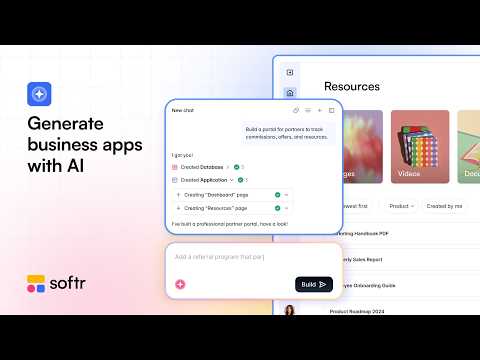
Softr can take a description and generate an application structure.
The AI Co-Builder can propose pages, a database and the initial business logic.
That makes app creation faster.
It does not remove the design work that matters.
A client portal needs to know which client can see which invoices.
An inventory system needs to know who can adjust stock.
A CRM needs to know who owns the account.
An approval app needs to know who can approve what.
Those are not styling decisions.
They are the operating rules.
The first generated app should therefore be treated like a structured draft.
Check the data model.
Check the relationships.
Check the user roles.
Check the actions.
Then edit.
This is where Softr differs from a prompt-to-code demo.
The generated result remains inside a visual system where a non-engineering team can continue to modify the schema, interface, permissions and workflow.
That managed abstraction is part of the value.
It is also part of the lock-in.
Both need to be understood.
Permissions are becoming the AI security boundary
Softr's permission model has always been important for portals.
It matters more now because AI agents can act through the same application.
User groups can control page access.
Blocks can be shown or hidden.
Actions can be restricted.
Records can be filtered by the signed-in user.
Business and Enterprise plans add stronger controls such as global data restrictions, two-factor authentication, domain restrictions, SSO, SCIM and audit logs.
The new App MCP Server turns those app rules into something more consequential.
A Softr app can act as an MCP server.
A user connects the app to an OAuth-capable AI assistant such as ChatGPT, Claude or Mistral.
The assistant signs in as that user.
It inherits what that person can already see and do.
Softr's current explanation is unusually concrete.
A list, grid or table can expose read capability.
A form can expose create capability.
Inline editing can expose update capability.
A delete action can expose delete capability.
No block, no access.
That means the interface is not only presentation.
It can become part of the agent's capability boundary.
This is a valuable design idea because many business AI deployments create a second permissions system.
The application has one access policy.
The API token has another.
The agent framework has another.
Those layers can drift apart.
Softr's App MCP approach tries to avoid that by deriving the AI user's capabilities from the existing app.
The benefit is simplicity.
The limitation is equally clear.
Bad app permissions become bad AI permissions.
MCP does not repair an over-permissioned portal.
A team should preview the app as every important user group before connecting external assistants.
Softr Agents push the same idea further
Softr Agents launched on August 26 and were announced publicly on August 27, 2026.
There are two main types.
App Agents live inside the application.
Scheduled Agents run recurring background tasks.
The App Agent can chat with users, search uploaded knowledge, read and write approved records, send email, send Slack messages and call supported external services.
Scheduled Agents can perform recurring work without waiting for a person to start the conversation.
This can turn a business app from a passive interface into an active operating layer.
An inventory app can monitor exceptions.
A CRM can research accounts.
A client portal can answer questions and update approved records.
An operations dashboard can prepare a recurring report.
The feature is new enough that WhatAI would resist the temptation to give it broad responsibility on day one.
Agentic systems have a different failure profile from fixed automation.
A workflow follows the branch you built.
An agent interprets a goal, chooses tools and can take several steps.
That flexibility is why it is useful.
It is also why tool permissions matter.
Softr supports Allow, Ask and Deny controls.
Write actions default toward confirmation in the current agent model.
That is sensible.
A read action can retrieve the wrong record and confuse the answer.
A write action can change the business.
The safest rollout is narrow.
One agent.
One role.
One measurable job.
Limited tools.
Then review the Runs panel.
Which model did it use?
Which tools did it call?
How many credits did it consume?
Did it make the correct decision?
Where did it fail?
Only after that evidence should the scope expand.
Scheduled Agents deserve even tighter controls because nobody is necessarily present to approve an action in real time.
If a scheduled job needs live confirmation to be safe, it is probably the wrong job for unattended autonomy.
Workflows still matter more than the agent hype suggests
Softr Workflows handle predictable automation.
A record is created.
A status changes.
A user clicks a button.
A schedule fires.
Then the workflow can branch, filter, loop, wait, call an API, run JavaScript or Python, send email, post to Slack, extract information from a PDF or invoke an AI model.
This is a mature way to think about automation.
Not every process needs an agent.
If the business already knows the exact rule, write the rule.
When status becomes approved, notify finance.
When a form arrives, create the record.
When inventory falls below a threshold, send the alert.
When the customer submits a document, extract the required fields.
Agent reasoning adds cost and uncertainty.
A deterministic workflow is easier to audit.
The strongest Softr architecture therefore has at least two automation layers.
Workflows for predictable steps.
Agents for ambiguous tasks.
The distinction can save AI credits and make the system easier to understand.
Database AI Agents are another separate layer
Softr also has Database AI Agents.
The name can make the product feel like it has several overlapping agent systems.
The scope is different.
Database AI Agents work at field or record level.
Summarize a note.
Classify a ticket.
Extract information from a PDF.
Research a company.
Fill missing product data.
Generate an email draft.
Tag a record.
These jobs are narrow and data-centric.
Softr's current documentation says builders can choose from models across providers including OpenAI, Anthropic, Gemini and Mistral for supported database AI work.
This is useful because the operation can be attached directly to the table where the result belongs.
It also creates a credit-management problem at scale.
A ten-record test can look inexpensive.
A 100,000-record enrichment job is a different operation.
Before running AI across a large database, sample.
Measure quality.
Measure credits.
Estimate the whole job.
Then decide whether the information being added is valuable enough to justify the cost.
Ask AI is deliberately less powerful
Ask AI is a useful contrast.
It is a conversational interface over data that the signed-in user can already see.
It is currently read-only.
It works at block level.
The user can ask questions about the records visible in that dynamic block.
The permission boundary follows the app.
This makes Ask AI useful for operational questions.
Which projects are overdue?
Summarize my open requests.
Which inventory items are below threshold?
What changed this month?
It is not an action agent.
It does not edit the record.
It does not currently reason across the whole app.
Softr says app-wide Ask AI is coming later.
There are also current data-source limitations.
The live Ask AI page says it is not yet available for blocks connected to Airtable, HubSpot or SQL.
That is a significant caveat because Airtable remains a major part of Softr's historical user base.
The limitation does not make Ask AI weak.
It clarifies which product layer should be used.
Need read-only block analysis?
Ask AI.
Need field enrichment?
Database AI Agent.
Need deterministic process automation?
Workflow.
Need a conversational system that can take actions?
Softr Agent.
That separation is one of the better aspects of the platform.
Vibe Coding reduces the old block-builder ceiling
Traditional no-code tools have a familiar trade-off.
They are fast because they give users pre-built components.
They become frustrating when the required component does not exist.
Softr introduced the Vibe Coding Block to close that gap.
A builder can describe the interface in plain language.
Softr generates the component.
The block can be static or connected to live data.
The builder can attach a screenshot or visual reference.
The underlying generated code can be opened and edited directly.
Version history helps recover from a bad iteration.
This materially changes the customization ceiling.
A builder no longer has to choose only from the standard block library.
It does not remove the platform boundary.
The whole Softr app cannot be exported as a standalone codebase.
Softr has explained that the application depends on its managed platform, so a full source export would not represent a portable independent app.
Vibe Coding blocks are different.
Their code can be inspected and edited.
That is enough for many business applications.
It is not the same as source-code ownership.
This distinction should be a central buying question.
If the app is an internal operations tool, managed hosting and no source export may be a good trade.
If the app is the company's core consumer software product and investors or engineers expect to own the complete codebase, the trade can become unacceptable.
Do not discover that difference after the application becomes critical.
The August pricing change matters for portals
Softr changed pricing on August 5, 2026.
The new model separates Team Users and Client Users.
It also introduces pay-as-you-go billing for additional users with a seven-day grace period after the included allowance is exceeded.
Existing paying customers were grandfathered on their current legacy plans.
That creates a temporary information problem.
Older reviews and old official material still show a different pricing structure.
The current post-change pricing-focused Softr materials are much clearer.
Free is zero.
Basic is $25 monthly or $19 per month billed annually.
Pro is $119 monthly or $99 annually.
Business is $395 monthly or $329 annually.
Enterprise is custom.
Current plan summaries list five team and five client users on Basic.
Pro includes ten team and fifty client users.
Business includes thirty team and one hundred client users.
Additional app users can be billed beyond the included amount.
This is more flexible than forcing a full plan jump whenever the user count moves slightly.
It can also be materially more expensive for large external audiences.
That matters because client portals are one of Softr's strongest use cases.
A company with thirty internal employees and fifty clients has a different cost profile from a membership business with ten thousand external users.
The new model recognizes the difference.
It also charges for it.
The correct way to evaluate Softr is to model the expected user mix twelve months from now.
Do not choose the plan only from today's pilot.
The same applies to AI credits, database records and workflow actions.
The application has several scaling dimensions.
A business needs to know which one will become expensive first.
The current Free-plan documentation is still settling
There is another reason to timestamp pricing.
Recent Softr pricing-focused articles published after the August change list five app users on Free.
Some other current product pages have shown a different user count.
That inconsistency is likely part of the migration between plan structures.
WhatAI would use the newest pricing-focused material for a public page and add the caveat.
The actual workspace billing screen is the purchase truth.
This is better than pretending conflicting first-party pages do not exist.
Fast-moving SaaS products accumulate stale pages.
A useful editorial page points out the conflict and tells the buyer which source to trust.
Security is unusually central to the product positioning
Softr's current security page documents SOC 2 Type II compliance, GDPR compliance, encryption in transit and at rest and 99.9 percent uptime.
It says user data is hosted in Europe, specifically Germany.
The platform has multiple permission layers and stronger Enterprise controls.
SSO over SAML and OpenID.
SCIM.
Application audit logs.
Database audit logs.
The permission model extends into Vibe Coding and MCP.
That last point is important.
The generated component does not automatically become a free-standing escape hatch around the app.
Softr says generated data actions are parsed into the visual configuration where existing permissions can be applied.
MCP also operates as the signed-in user.
These controls support the idea that AI is being added around an existing governance layer rather than bolted onto the side.
There are still external data and AI processing questions.
A Softr app can connect to Airtable, HubSpot, SQL systems and external AI providers.
Those systems have their own data locations and terms.
A business should review the complete data path, not only the Softr database.
A healthcare template also does not establish that the full deployment is HIPAA eligible.
If a company needs regulated processing, obtain the contractual answer, including any required BAA, before putting protected data into the app.
Review evidence supports the core positioning
Capterra updated its Softr page on September 4, 2026.
It currently shows 4.7 out of 5 across 64 reviews.
Ease of use is 4.8.
Customer service is 4.8.
The recent reviews reinforce Softr's clearest strength.
People can build useful internal tools without much technical effort.
A recent August review called the learning curve short and the platform useful for functional apps.
The same reviewer also flagged limits when projects become more complex.
That is the trade.
Ease comes from constraints.
Vibe Coding can extend those constraints.
It cannot make a managed no-code platform identical to a full custom engineering environment.
Another current Capterra theme is performance when Softr sits on top of external data.
One reviewer specifically mentions slower Airtable querying.
That should be tested with the real dataset.
A ten-row demo does not reveal the performance of a production portal with thousands of records, filters and permissions.
Independent review coverage also needs freshness checks.
Superapp published a detailed Softr review on August 5, 2026.
Its framing around web apps, PWAs and lack of native App Store output is useful.
Its pricing section became stale at roughly the same time because Softr announced the new plans on August 5.
This is a good example of why product research should separate durable observations from volatile facts.
The mobile-output limitation is durable.
The old plan prices are not.
Softr versus Glide
Glide is one of the closest alternatives for teams building data-backed business apps.
Glide is strong for polished, mobile-friendly internal apps and operational tools.
Softr is particularly strong for portals, flexible web interfaces, permissions, native databases and the growing AI-agent layer.
The difference should be tested against the actual app.
How complex are the user roles?
How many external users will log in?
Does the team need a client-facing portal or a mobile-first internal tool?
How much custom UI is required?
Which data source already exists?
Do agents need to take permission-aware actions?
Do not choose from screenshots.
Build the same thin slice.
Softr versus Bubble
Bubble is a different trade.
Bubble offers much more freedom for highly custom web products and deeper application logic.
That freedom creates a larger learning curve and a heavier application-development model.
Softr is more opinionated.
It is faster for standard business software such as portals, operations apps and internal systems.
A founder building a custom marketplace or consumer SaaS may prefer Bubble's flexibility.
An operations team replacing spreadsheets and email approvals may prefer Softr's maintained components and governance.
Again, the job decides.
Softr versus AI code generators
Tools such as Lovable and Replit make the comparison more interesting in 2026.
A code-generating tool can provide greater source ownership and engineering flexibility.
Softr provides more of the operating system around the app.
Permissions.
Hosted data.
Workflows.
Managed blocks.
User administration.
Agent controls.
MCP.
The decision is not no-code versus AI.
It is managed business platform versus exportable software project.
The managed platform reduces engineering burden.
The exportable project reduces platform dependency.
A buyer should know which risk matters more.
The affiliate program is straightforward
Softr has an official affiliate program.
The current affiliate documentation says affiliates receive 25 percent commission for the first year on revenue from referred customers.
The public page does not expose every cookie, attribution and payout detail in the text WhatAI could verify.
Those details should therefore come from the approved affiliate account rather than being invented.
Softr also runs a Certified Partner program.
That is separate.
Certified partners can earn up to 30 percent revenue share for 12 months.
Premium Partners can earn up to 30 percent for 24 months.
The partner program requires certification and project experience and is designed for agencies and consultants building Softr systems for clients.
WhatAI should treat those as two distinct monetization paths.
Affiliate for editorial referrals.
Partner program for service providers.
The commission should never alter the product verdict.
A practical Softr test
Start with one process that already hurts.
A client approval process is a good example.
Define the records.
Clients.
Projects.
Deliverables.
Comments.
Approvals.
Create the app with the Co-Builder.
Then stop thinking about AI.
Set permissions.
A client should only see their own projects.
A project manager should see assigned projects.
An administrator can see all records.
Preview the app as each role.
Now build one deterministic Workflow.
When a deliverable is approved, notify the project team and update status.
Then add one database AI task if it solves a real problem.
Summarize client feedback.
Then add Ask AI to a relevant block if users need to query the visible data.
Then test an App Agent.
Give it read access to project records and permission to draft an update.
Require confirmation before it changes status.
Run it against real examples.
Inspect the agent log.
Measure credits.
Only after that works should the agent receive another tool.
This order matters.
The business system becomes trustworthy before the AI becomes autonomous.
That is the strongest way to use Softr.
Who should shortlist Softr
Operations teams are the clearest fit.
They often have real processes living in spreadsheets, forms, email and disconnected SaaS tools.
Agencies and consultants can build client portals and internal delivery systems.
Service businesses can build intake and account-management apps.
Companies using Airtable or Google Sheets can add a controlled interface around existing data.
Teams that want AI agents but do not want to engineer authentication, permission systems and tool registries from scratch have an increasingly interesting reason to evaluate Softr.
Who should use something else
A consumer startup that needs a native App Store application should use a mobile-oriented builder or conventional mobile engineering stack.
A company that requires full source-code ownership should prefer an exportable-code platform.
A deeply custom SaaS product with unusual backend architecture can outgrow Softr's managed boundaries.
A public membership product with a very large logged-in audience should model the new client-user pricing carefully.
A company whose only need is one simple automation may not need an app platform at all.
The WhatAI view
Softr's most durable advantage in 2026 is not that AI can generate an app.
Many tools can generate an interface.
The stronger idea is that the generated app remains a governed business system.
The data model is visible.
The permissions are visible.
The workflows are visible.
The actions are visible.
The agent inherits those boundaries.
MCP inherits those boundaries.
That makes Softr's app layer a control plane for people and AI.
The managed platform is also the main trade-off.
You do not own a portable full application codebase.
You depend on Softr's runtime, pricing and product direction.
For many internal tools and portals, that is a reasonable exchange for speed and lower engineering burden.
For a core software product, it may not be.
Know what is available. Use only what earns a place in your workflow.
For Softr, AI earns its place when it sits inside a business system whose data, permissions and actions remain understandable after the prompt is gone.
Softr is an AI-first no-code platform for building real business apps around data, permissions and workflows. Its 2026 product now spans prompt-based app generation, Vibe Coding, native databases, workflow automation, MCP and action-taking Softr Agents.
Where Softr Earns Its Place
Softr is strongest when a business needs a governed web app rather than a disposable prototype. Authentication, data restrictions, workflows and permissions remain visible after AI generation, which makes the result easier for a non-engineering team to operate.
The Portability and User-Scaling Trade-Off
Softr trades source-code portability for a managed platform and fast deployment. Its August 2026 pricing also separates team and client users, so external-user-heavy portals should model pay-as-you-go user costs before committing.
About Softr
Softr is an AI-first no-code platform for building business software such as internal tools, client portals, CRMs, inventory systems, dashboards, intranets and operational apps. Its platform combines an AI Co-Builder, Softr Databases, a visual block editor, Vibe Coding for custom AI-generated components, Workflows, Forms, granular permissions, Ask AI, Database AI Agents and the new Softr Agents introduced in August 2026. Softr apps can also act as permission-aware MCP servers so users can work with app data from supported AI assistants. Softr is strongest when a business needs a governed web application around structured data and workflows without building and maintaining a conventional custom software stack.
Use Cases
Key Features
- ✓ AI Co-Builder
- ✓ Prompt-to-app generation
- ✓ Prompt-to-database generation
- ✓ Follow-up questions during AI app generation
- ✓ Visual no-code app editor
- ✓ Pre-built application blocks
- ✓ Vibe Coding Block
- ✓ AI-generated custom UI components
- ✓ Editable generated component code
- ✓ Version history for Vibe Coding blocks
- ✓ Static and data-connected Vibe Coding blocks
- ✓ Softr Databases
- ✓ Relational database fields
- ✓ Database views
- ✓ Database record permissions
- ✓ Forms
- ✓ Conditional form logic on eligible plans
- ✓ Client portals
- ✓ Partner portals
- ✓ Vendor portals
- ✓ Internal tools
- ✓ CRMs
- ✓ Inventory apps
- ✓ ERP-style operational apps
- ✓ Dashboards
- ✓ Knowledge bases
- ✓ Company intranets
- ✓ Authentication
- ✓ Email and password sign-in
- ✓ One-time code sign-in on eligible plans
- ✓ Google sign-in on eligible plans
- ✓ Two-factor authentication on Business
- ✓ SAML SSO on Enterprise
- ✓ OpenID SSO on Enterprise
- ✓ SCIM on Enterprise
- ✓ User groups
- ✓ Page-level visibility
- ✓ Block-level visibility
- ✓ Action-level permissions
- ✓ Record-level data restrictions
- ✓ Global data restrictions on eligible plans
- ✓ Domain-restricted sign-up on Business
- ✓ Invite-only sign-up
- ✓ Application audit logs on Enterprise
- ✓ Database audit logs on Enterprise
- ✓ Softr Workflows
- ✓ Record-triggered workflows
- ✓ User-action-triggered workflows
- ✓ Scheduled workflows
- ✓ Webhook-triggered workflows on eligible plans
- ✓ REST API actions
- ✓ Conditional branches
- ✓ Filters
- ✓ Loops
- ✓ Wait steps
- ✓ Custom JavaScript workflow actions
- ✓ Custom Python workflow actions
- ✓ Email automation
- ✓ Slack automation
- ✓ Calendar automation
- ✓ PDF extraction
- ✓ Webpage scraping
- ✓ AI workflow actions
- ✓ OpenAI workflow actions
- ✓ Anthropic workflow actions
- ✓ Database AI Agents
- ✓ AI field enrichment
- ✓ AI summarization
- ✓ AI classification and tagging
- ✓ AI extraction from files
- ✓ AI web research
- ✓ AI record enrichment
- ✓ Model choice across supported providers
- ✓ Ask AI
- ✓ Permission-aware AI questions over app data
- ✓ Block-level conversational analytics
- ✓ Softr Agents
- ✓ App Agents
- ✓ Scheduled Agents
- ✓ Knowledge files for agents
- ✓ Agent tool permissions
- ✓ Allow, Ask and Deny tool controls
- ✓ Agent run history
- ✓ Agent token and credit visibility
- ✓ Agent model selection
- ✓ Agent reasoning-effort controls where supported
- ✓ External MCP tools for agents
- ✓ Custom MCP connections
- ✓ App MCP Server
- ✓ OAuth-based MCP authentication
- ✓ Permission-aware MCP access
- ✓ Softr workspace MCP
- ✓ Progressive Web App publishing on eligible plans
- ✓ Custom domains
- ✓ Custom code on eligible plans
- ✓ External data sources
- ✓ Airtable integration
- ✓ Google Sheets integration
- ✓ Notion integration
- ✓ SmartSuite integration
- ✓ Xano integration
- ✓ Coda integration
- ✓ monday.com integration
- ✓ Supabase integration
- ✓ ClickUp integration
- ✓ HubSpot integration
- ✓ BigQuery integration
- ✓ SQL database connections
- ✓ REST API data connections
- ✓ SOC 2 Type II compliance
- ✓ GDPR compliance
- ✓ EU data hosting
- ✓ Encryption in transit
- ✓ Encryption at rest
Pricing
Free
$0/month
- • Unlimited apps, databases, workflows and forms
- • Up to 3 builders in current post-August 2026 pricing materials
- • 5 app users in current pricing-focused materials
- • 5 AI credits per month
- • 5,000 Softr Database records
- • 500 workflow actions per month
- • Designed for testing and small apps
Basic Monthly
$25/month
- • 1 builder
- • Extra builder currently $6/month
- • 5 team users
- • 5 client users
- • 10 AI credits per month
- • 50,000 Softr Database records
- • 2,500 workflow actions per month
- • Custom domain
Basic Annual
$19/month billed annually
- • Same core Basic feature set
- • Lower effective monthly price than month-to-month billing
Pro Monthly
$119/month
- • 2 builders
- • Extra builder currently $12/month
- • 10 team users
- • 50 client users
- • Additional app users available from approximately $1/month under current pricing materials
- • 50 AI credits per month
- • 500,000 Softr Database records
- • 10,000 workflow actions per month
- • Remove Softr branding
- • Granular permissions and visibility
- • Custom code
- • Expanded authentication and business-app controls
Pro Annual
$99/month billed annually
- • Same core Pro feature set
- • Lower effective monthly price than month-to-month billing
Business Monthly
$395/month
- • 3 builders
- • Extra builder currently $24/month
- • 30 team users
- • 100 client users
- • Additional app users available from approximately $2/month under current pricing materials
- • 100 AI credits per month
- • 1,000,000 Softr Database records
- • 25,000 workflow actions per month
- • Two-factor authentication
- • Global data restrictions
- • Progressive Web App support
- • Priority support
Business Annual
$329/month billed annually
- • Same core Business feature set
- • Lower effective monthly price than month-to-month billing
Enterprise
Custom
- • Custom limits
- • SAML and OpenID SSO
- • SCIM
- • Application audit logs
- • Database audit logs
- • SOC 2 report access
- • Advanced security and governance
- • Custom agreements and SLAs
- • Customer Success Manager
- • Custom integrations and deployment support
Pricing varies by plan and region — see current pricing.
Plan features change — last updated: 2026-09-06.
Details
Tags
Softr — Frequently Asked Questions
What is Softr?
Softr is an AI-first no-code business app builder. It combines app interfaces, databases, authentication, permissions, workflows, forms and AI features so teams can build internal tools, portals, CRMs, dashboards and other operational software without creating a conventional software stack from scratch.
How much does Softr cost in September 2026?
Softr's current post-August 2026 pricing materials list Free at $0, Basic at $25 monthly or $19 per month billed annually, Pro at $119 monthly or $99 annually, Business at $395 monthly or $329 annually, and Enterprise at custom pricing. User, AI-credit, database and workflow limits vary by tier.
Why do some Softr pages show different pricing?
Softr introduced a new pricing structure on August 5, 2026. Existing paying customers were grandfathered on legacy plans while new pricing separated Team Users and Client Users and introduced pay-as-you-go additional-user billing. Some older official pages and independent reviews still show the legacy $49, $139 and $269-era pricing, so the live billing page should be treated as the purchase-level source of truth.
Does Softr have a free plan?
Yes. Current pricing-focused Softr materials list a Free plan with unlimited apps, databases, workflows and forms, up to three builders, five app users, five AI credits per month, 5,000 Softr Database records and 500 workflow actions per month. Some other Softr product pages still show different user counts during the pricing migration, so verify the live account limit before building around the free allowance.
What are Softr Agents?
Softr Agents are AI assistants introduced in August 2026. App Agents live inside Softr applications and can answer questions or take actions under the signed-in user's permissions. Scheduled Agents run recurring background tasks. Agents can use knowledge files, read and write approved records, send messages and connect to external services through supported tools and MCP.
What is the difference between Softr Agents, Ask AI and Database AI Agents?
Softr Agents are app-level or scheduled agents that can take actions. Ask AI is currently a read-only, block-level conversational layer over data the user is permitted to see. Database AI Agents operate at the record or field level for enrichment, extraction, classification, summarization and research. They solve different layers of the app.
Can Softr connect to ChatGPT or Claude through MCP?
Yes. A published Softr app can act as an MCP server. The external AI assistant authenticates through OAuth as the specific app user and inherits that user's page, block, action and data restrictions. Softr also documents a separate workspace-level MCP surface for builders working with apps, databases and workflows.
Can Softr export the full app source code?
No. Softr can expose and let users edit code inside Vibe Coding blocks, but Softr has stated that the full application cannot be exported as a standalone codebase because the app relies on Softr's managed platform. This is an important portability difference from code-generating builders.
Can Softr build native iOS and Android apps?
Softr can publish Progressive Web Apps on eligible plans. A PWA can be installed on a phone and behave like an app, but it is not the same as a native iOS or Android binary or an exportable App Store project. Buyers requiring native mobile code should compare native or cross-platform app builders.
Is Softr secure for business apps?
Softr documents SOC 2 Type II compliance, GDPR compliance, TLS encryption, encryption at rest and European data hosting in Germany. Its permission system supports user groups, page and block visibility, record restrictions, and Enterprise SSO, SCIM and audit logs. Security still depends on how the app, external data sources and agent permissions are configured.
How long is the Softr trial?
Softr's current FAQ describes a 7 plus 7 day trial, for a maximum of 14 days. Additional trial days require card details. The FAQ also says the first monthly payment can be eligible for refund within 14 days and the first annual payment within 30 days, subject to Softr's current policy.
Does Softr have an affiliate program?
Yes. Softr's official affiliate documentation currently states that affiliates receive 25% commission for the first year on revenue from referred customers. This is separate from the Certified Partner program, where qualifying service partners can receive up to 30% revenue share for 12 months and Premium Partners up to 30% for 24 months.
Sources & References
- Softr official AI business app builder ↗
- Softr current pricing page ↗
- Softr August 2026 pricing-change announcement ↗
- Softr August 2026 pricing comparison with current Softr plan table ↗
- Softr August 2026 pricing comparison confirming current plan limits ↗
- Softr AI App Generator and AI Co-Builder ↗
- Introducing Softr Agents, August 2026 ↗
- Softr current product changelog ↗
- Softr Workflows product page ↗
- Softr Workflows documentation ↗
- Softr Database AI Agents ↗
- Softr Database AI Agents guide updated July 2026 ↗
- Softr Ask AI capabilities and current data-source limits ↗
- Softr Vibe Coding documentation ↗
- Softr Vibe Coding Block guide ↗
- Official Softr Vibe Coding Block introduction ↗
- Softr App MCP Server and permission model ↗
- Softr MCP guide updated August 2026 ↗
- Softr security, SOC 2, GDPR and data-hosting information ↗
- Softr Enterprise security and governance ↗
- Softr current trial and refund FAQ ↗
- Softr official affiliate program ↗
- Softr customer referral program ↗
- Softr Certified Partner program and revenue share ↗
- G2 Softr customer reviews ↗
- Capterra Softr reviews updated September 2026 ↗
- Superapp independent Softr review published August 2026 ↗
- Official Softr: How to Build Business Apps With AI, No Coding Required ↗
- Official Softr: Introducing the Vibe Coding Block ↗
- Dan Smart Tutorials: Softr Client Portal Tutorial 2026 ↗
- Beau Carnes: How to Build AI Apps for Your Business With Softr ↗
Try Softr
Visit the official website to get started with Softr today.
Visit Softr →