Universal Robots Builds a Physical AI Layer on Its Cobot Platform
The 2026 UR AI Trainer joins a larger robot portfolio, browser simulation, modern motion tools, and AI Accelerator hardware, widening UR from approachable cobots into an industrial automation and learning platform.
By WhatAI Editorial Team ·
Universal Robots Is Becoming More Than a Cobot Vendor
Universal Robots built its reputation by making industrial robot arms feel less forbidding. A UR cobot could be hand-guided, programmed through a graphical interface, mounted in places where a traditional robot might demand heavier infrastructure, and adapted when the production task changed. That combination helped collaborative automation move from specialist engineering departments into smaller factories, mixed production environments, training centres, and workcells owned by people who did not want every adjustment to become a major integration project.
That original promise remains visible in 2026, but the company around it has become broader. Universal Robots now sells a lightweight e-Series and a higher-performance UR Series, with current models spanning compact 3 kg payload work through top-down configurations advertised at up to 35 kg. PolyScope has grown from an approachable teach-pendant interface into a wider software platform. UR Studio brings workcell simulation into a browser. MotionPlus coordinates external axes. OptiMove simplifies faster, smoother motion. UR+ supplies a large catalogue of tested peripherals and application components. The AI Accelerator adds industrial compute and vision, while the new UR AI Trainer turns production-grade arms into a data-capture system for robot learning.
This evolution makes Universal Robots more interesting, but it also raises the level of judgement required from a buyer. A cobot is not a self-contained employee and an arm is not a finished automation outcome. The useful question is not whether Universal Robots has an easy interface or an impressive AI roadmap. It is whether a specific arm, tool, fixture, sensor, safety design, program, operator process, support arrangement, and expected cycle time form a workcell that can deliver reliably. UR provides a strong platform for that work. It does not remove the work.
A Broader Portfolio Changes the Buying Conversation
The e-Series remains the lightweight starting point. Universal Robots currently presents the family as the UR3e, UR7e, UR12e, and UR16e, covering advertised payloads from 3 kg to 16 kg and reaches from 500 mm to 1300 mm. These arms fit tasks such as small-parts assembly, screwdriving, inspection, machine tending, packaging, and material handling where compact mounting and easy redeployment matter. The renaming of the upgraded UR5e and UR10e to UR7e and UR12e makes payload capability clearer for new buyers, although existing installations and documentation may still use the earlier names.
The UR Series is the heavier and faster family. It now includes UR8 Long, UR15, UR18, UR20, and UR30. The range gives engineers different combinations rather than a simple ladder. UR8 Long offers 1750 mm reach with a slim arm and an 8 kg standard payload. UR15 pairs a 1300 mm reach with 15 kg standard payload and higher-speed performance. UR18 places an 18 kg payload inside a comparatively compact 950 mm reach envelope. UR20 extends to 1750 mm for larger workspaces, while UR30 favours heavy handling within 1300 mm.
Payload language needs close reading. Universal Robots publishes standard ratings of 8, 15, 18, 20, and 30 kg for those UR Series models, but also advertises higher maximum figures in approved top-down-only configurations: 10 kg for UR8 Long, 17.5 kg for UR15, 18 kg for UR18, 25 kg for UR20, and 35 kg for UR30. The practical limit also depends on reach, centre-of-gravity offset, tool weight, orientation, acceleration, and the model’s payload curve. A headline maximum should never substitute for an application calculation.
The Familiar UR Simplicity Still Matters
PolyScope is the common thread across the portfolio. Its graphical node-based programming, guided flows, waypoints, integrated force functions, scripting, APIs, and external communication options allow an operator to begin visually while giving an integrator room to build something more sophisticated. Universal Robots says PolyScope is included with each system. PolyScope 5 remains supported across established deployments, while PolyScope X is the more current platform for advanced capability, simulation, cybersecurity development, and an API-first ecosystem.
Ease of programming should be understood as reduced friction, not the absence of engineering. Teaching a few positions can be quick. Delivering an unattended machine-tending cell that recovers gracefully from a misloaded part, manages tool wear, communicates with a PLC, maintains safe states, meets takt time, and survives production variation is a different task. PolyScope can make logic visible and modifications approachable, but robust automation still depends on process knowledge, fixtures, sensing, exception handling, validation, and maintainable code.
UR’s motion layer has also become more capable. OptiMove replaces much of the manual speed and acceleration tuning with a jerk-limited motion engine and a simpler performance control. Universal Robots advertises faster cycle times and smoother behaviour compared with carefully tuned classic programs, though actual results will depend on the path, payload, task, and safety constraints. MotionPlus synchronises a robot with external axes such as linear rails, positioners, and turntables. Direct Torque Control provides an advanced low-level interface for force and motion research. These are meaningful capabilities, but they serve different users and should not be treated as one universal upgrade.
Collaborative Does Not Mean Guardless
Universal Robots describes its arms as power-and-force-limited industrial robots with configurable safety functions. The current safety material says safety functions are certified to Performance Level d, Category 3, and the company lists certification against the applicable 2011 generation of ISO 10218-1 while it works toward the revised 2025 standard. Those credentials matter because safety behaviour must be predictable independently of ordinary application logic.
They do not make every completed application collaborative. Universal Robots explicitly states that only the application can be judged safe or unsafe and that every robot application requires a risk assessment. The arm, end effector, carried workpiece, speed, force, reachable space, trapping points, sharp edges, temperature, process hazards, and interaction with nearby equipment all affect the result. A lightweight arm holding a blade, hot part, heavy box, or powered spindle may require scanners, reduced modes, interlocks, guarding, separation monitoring, or a fully enclosed cell.
This distinction is especially important as payloads and speeds rise. A system can be collaborative capable while operating at industrial speed behind guarding for much of its cycle. Reduced mode can support closer interaction at another stage. The right design may combine guarded production, monitored access, hand-guided setup, and carefully limited collaborative steps rather than forcing the entire application into one label. Buyers should ask the integrator to show the risk assessment, safeguarding concept, validation evidence, stop behaviour, restart rules, and operator training plan.
The Workcell, Not the Arm, Determines the Budget
Universal Robots does not publish a universal list price for each configuration and directs buyers to local distributors. That is sensible because the arm is only the baseline. End-of-arm tooling, tool changers, vision, force sensing, fixtures, part presentation, conveyors, pedestals, linear axes, safety scanners, guarding, PLC integration, electrical work, programming, commissioning, training, support, maintenance, and documentation can materially change the project cost. A simple pick-and-place pilot and a multi-SKU palletising cell may use the same brand while having very different economics.
The official pricing guide describes capital purchase, leasing or financing, robotics-as-a-service, and short-term rental pilots as possible acquisition structures. Availability will depend on country, distributor, project, and credit terms. Financing can change cash flow, but it does not repair a weak application. A credible proposal should separate robot hardware, tooling, safety, integration, installation, training, recurring software or service, maintenance, spares, and change requests. It should also state what production acceptance looks like and who is responsible when upstream variation prevents the cell from meeting its target.
Return on investment is most believable when it starts with the process. Measure current labour time, ergonomics, injuries or risk exposure, scrap, downtime, rework, queueing, throughput, changeover, supervision, and the cost of unplanned stops. Then model expected availability, cycle time, operator involvement, consumables, maintenance, and product-mix changes. Universal Robots can enable flexible automation, but flexibility has value only when the workcell can actually be retaught, retooled, moved, and revalidated without consuming the savings it was meant to create.
UR Studio Makes Evaluation More Concrete
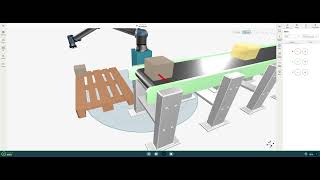
UR Studio is one of the most practical additions to the platform because it moves early evaluation into a browser. Users can assemble a virtual cell from robot models, modules, end effectors, conveyors, pallets, and other elements, then examine reach, placement, collisions, program logic, and estimated cycle time. Custom GLB or GLTF models can represent real workpieces and equipment. Projects can be shared before physical hardware is committed.
The connection to PolyScope X is important. Universal Robots says programs created in the simulation environment are intended to behave consistently when deployed through the corresponding platform. This can make concept reviews and integrator conversations more concrete, especially for teams that previously relied on static reach diagrams or optimistic sales sketches. It can also expose a bad pedestal position, unreachable corner, collision, or inappropriate model earlier in the process.
Simulation is still a model. It will not automatically capture flexible cables, worn grippers, part tolerances, reflective surfaces, dust, vibration, human loading variation, network delays, safety response, or every dynamic interaction. Cycle-time estimates are useful inputs, not guaranteed acceptance results. A good workflow uses UR Studio to eliminate obvious mistakes, then verifies the real process with representative parts, tools, environmental conditions, fault cases, and operators.
The Ecosystem Is the Real Moat
UR+ may be more important to many buyers than another small improvement in arm specifications. The marketplace brings together approved grippers, vacuum systems, vision, sensors, feeders, tool changers, range extenders, protective equipment, bases, software, calibration tools, communication packages, and complete application kits. URCaps allow partner functions to appear inside the robot’s software environment. This reduces the amount of custom plumbing required for common combinations and gives integrators a better starting point.
Approved compatibility is not the same as a complete solution guarantee. The selected gripper still has to hold the actual part. The camera still needs workable lighting and geometry. The palletiser must fit the box range, pallet pattern, ceiling, and rate. Software versions and URCap compatibility must be maintained. The final integrator remains responsible for the cell. Buyers should verify supported robot models, PolyScope versions, regional availability, lead times, spare parts, warranties, responsibility boundaries, and what happens when two vendors blame each other.
Universal Robots Academy adds another layer of value. Free e-learning, video material, in-class courses, virtual instruction, simulator-based training, and certified training partners give operators, engineers, educators, and maintenance teams a structured way to learn. Training should not end with the person who commissioned the cell. A resilient deployment needs more than one employee who can recover from routine faults, load the correct program, inspect the tooling, understand the safety state, and know when to escalate rather than improvise.
Physical AI Moves from Pitch to Product Strategy
Universal Robots is now positioning its platform for physical AI as well as conventional automation. The AI Accelerator packages an NVIDIA Jetson AGX Orin 64 GB compute module, an Orbbec Gemini 335Lg 3D camera, mounting and cabling, PolyScope X access, ROS 2 support, and developer resources. It is available to order for building computer-vision and learned-motion applications on UR Series and e-Series arms. This is more concrete than simply attaching an AI label to the robot, because it defines a supported compute and perception path.
The 2026 UR AI Trainer pushes further upstream. Developed with Scale AI, it uses a leader-follower setup so a human-guided robot demonstration can be reproduced while synchronized motion, force, and visual information is captured. The resulting structured multimodal data is intended for training vision-language-action models. Universal Robots presents the system as a bridge between research data collection and deployment on production-grade hardware, using its Direct Torque Control and force-feedback capabilities alongside Scale AI software.
That is strategically significant. Robot learning is often constrained by scarce, inconsistent, or laboratory-specific data. Capturing demonstrations on the same class of hardware intended for deployment could improve the path from a learned policy to an industrial application. The company also showed foundation-model and dual-arm demonstrations with partners in 2026, signalling that it wants UR hardware to be an execution layer for third-party intelligence rather than a closed robot with a single approved programming method.
Where Classical Automation Still Wins
Physical AI does not make deterministic automation obsolete. A fixed pick-and-place routine with known parts, controlled presentation, proven guarding, and a stable cycle may be cheaper, easier to validate, and easier to support with conventional programming. Learned behaviour becomes more attractive when perception, variation, contact, dexterity, or task diversity make explicit programming brittle or uneconomic. Even then, the AI component needs boundaries, monitoring, recovery, validation, data governance, change control, and a safe fallback.
The practical lesson is to match uncertainty with the simplest reliable method. Use fixtures when fixtures solve the problem. Use conventional vision when conventional vision is sufficient. Use OptiMove to improve a known path. Use MotionPlus when an external axis is necessary. Use AI Accelerator when a perception or learned-motion application has a credible advantage. Use AI Trainer when the organisation genuinely needs industrial demonstration data and has the modelling expertise to turn it into controlled behaviour. The platform’s breadth is valuable because it supports this ladder rather than requiring every project to begin at the most fashionable rung.
Who Should Shortlist Universal Robots
Universal Robots deserves a serious look from manufacturers, laboratories, integrators, educators, and automation teams that value a mature ecosystem, portable arms, approachable programming, broad application coverage, and a path from simple cells to more advanced software. It is particularly well suited to high-mix environments where redeployment matters, existing factories where heavy infrastructure is undesirable, and organisations that want many partners and trained people available around a common platform.
It is not automatically the best fit for the fastest high-volume process, the heaviest payload, the harshest environment, a safety-critical application demanding a different architecture, or a buyer seeking a complete outcome without an integrator. Some projects will favour traditional industrial robots, SCARA systems, delta robots, purpose-built machinery, autonomous mobile platforms, or another cobot vendor. The correct comparison includes payload curves, reach, speed, repeatability, ingress protection, mounting, safety, tooling, software, service, integration skill, installed base, and lifecycle cost.
WhatAI Editorial Verdict
Universal Robots has become a platform in the full sense of the word. The arm range is wider, the UR Series is more industrial, PolyScope is deeper, UR Studio makes early design more accessible, UR+ lowers integration friction, and the physical AI tools give developers a credible route into perception, learning, and data capture. The company reports more than 100,000 cobots sold, and that installed base strengthens the training, partner, support, and component ecosystem around every new system.
Its greatest strength is not that automation becomes effortless. It is that the path from first concept to a maintainable cell is unusually legible. Buyers can simulate, select an arm, add tested components, program through a familiar interface, train staff, and extend the platform as needs grow. The greatest risk is mistaking that accessibility for certainty. Safety, process stability, integration, validation, and economics remain application responsibilities. Universal Robots gives teams a capable set of building blocks, including genuinely interesting AI ones. The quality of the factory outcome still depends on how thoughtfully those blocks are assembled.
Universal Robots offers lightweight e-Series cobots and higher-performance UR Series arms, supported by PolyScope programming, UR Studio simulation, the UR+ ecosystem, training, motion tools, and an expanding physical AI platform. The range covers compact automation through higher-payload industrial workcells.
Models, Pricing, Safety, Software, and Best Fit
UR hardware is sold through distributors and integrators using custom quotations. The complete budget can include tooling, vision, fixtures, safety, integration, commissioning, training, maintenance, and support. Collaborative capability does not remove the need for an application risk assessment and suitable safeguarding.
Should You Choose Universal Robots in 2026?
Universal Robots is a strong choice for organisations that value accessible programming, broad partner support, flexible deployment, a mature component ecosystem, and a path from conventional automation to AI-enabled robotics. It is not a turnkey answer by itself: process design, safety, integration, validation, and lifecycle economics determine whether the project succeeds.
About Universal Robots (UR)
Universal Robots is an industrial collaborative robot platform covering compact e-Series arms and higher-performance UR Series models. The portfolio supports payloads from 3 kg to a maximum advertised 35 kg in approved top-down configurations, with reaches from 500 mm to 1750 mm. UR combines six-axis hardware, configurable certified safety functions, PolyScope programming, browser-based UR Studio simulation, UR+ components, training, developer interfaces, coordinated motion, and physical AI tools. Buyers normally purchase through distributors or integrators and must budget for the complete workcell, not only the arm.
Use Cases
Key Features
- ✓ e-Series arms for compact and lightweight automation
- ✓ UR Series arms for higher payloads and performance
- ✓ Current advertised payload span from 3 kg to 35 kg
- ✓ Reach options from 500 mm to 1750 mm
- ✓ Six-axis articulated robot architecture
- ✓ Configurable certified safety functions
- ✓ PolyScope graphical programming and scripting
- ✓ PolyScope X platform for advanced deployments
- ✓ URCaps extensions and open integration interfaces
- ✓ UR Studio browser-based workcell simulation
- ✓ OptiMove motion optimisation
- ✓ MotionPlus coordination with external axes
- ✓ UR+ approved components and application kits
- ✓ Free and instructor-led UR Academy training
- ✓ AI Accelerator compute and vision toolkit
- ✓ UR AI Trainer for multimodal robot-learning data
Pricing
Robot System
Custom distributor quote
- • Selected e-Series or UR Series arm
- • Controller and applicable teach pendant
- • PolyScope software included
- • Price varies by model and region
- • Local distributor provides the quotation
Complete Workcell
Custom project quote
- • Robot system and end-of-arm tooling
- • Fixtures, sensing, safety, and infrastructure
- • Programming, integration, and commissioning
- • Training, documentation, and acceptance
- • Total depends on application complexity
Flexible Acquisition
Varies by provider and region
- • Capital purchase
- • Leasing or equipment finance
- • Robotics-as-a-service where available
- • Short-term rental pilots where available
- • Terms depend on distributor and project
Add-ons and Services
Varies
- • UR+ components and application kits
- • Optional software and developer packages
- • Integration and engineering services
- • Training and support plans
- • Maintenance, spares, and extended warranty
Pricing varies by plan and region — see current pricing.
Plan features change — last updated: 2026-08-17.
Details
Tags
Universal Robots (UR) Community Discussions
Explore community discussions. Ask and answer questions on Universal Robots (UR) to grow and learn together.

Universal Robots (UR) Showcase
Universal Robots (UR) — Frequently Asked Questions
What is Universal Robots?
Universal Robots is a manufacturer and platform provider for industrial collaborative robot arms. Its system includes e-Series and UR Series hardware, PolyScope software, simulation, training, partner components, services, and physical AI tools.
Which Universal Robots models are current?
Universal Robots currently presents the e-Series as UR3e, UR7e, UR12e, and UR16e, and the UR Series as UR8 Long, UR15, UR18, UR20, and UR30.
What payloads can Universal Robots handle?
Current advertised ratings span 3 kg to 35 kg. The highest UR Series figures can apply only to approved top-down configurations, so buyers must check payload curves, orientation, reach, tooling, and centre of gravity.
How much does a Universal Robots cobot cost?
Universal Robots directs buyers to local distributors for pricing. The final project cost depends on the arm, tooling, sensing, safety, fixtures, infrastructure, integration, programming, training, support, and maintenance.
Can Universal Robots be leased?
Yes. Universal Robots documents leasing or equipment finance and also discusses robotics-as-a-service and short-term pilots. Availability and terms depend on region, distributor, provider, and project.
Is PolyScope included with the robot?
Yes. Universal Robots says PolyScope and PolyScope X are included in the robot cost, although some optional software packages and extensions require a separate purchase or licence.
What is the difference between PolyScope 5 and X?
PolyScope 5 supports established e-Series and UR Series deployments. PolyScope X is the newer platform designed for stronger cybersecurity, modern APIs, simulation, and more advanced software capabilities.
What is UR Studio?
UR Studio is a browser-based simulation tool for building virtual workcells, checking reach and collisions, testing programs, estimating cycle time, comparing layouts, and sharing concepts before physical deployment.
What is UR+?
UR+ is Universal Robots’ ecosystem of tested components, software, end effectors, sensors, vision systems, application kits, and solutions designed to integrate with UR hardware and software.
Does a Universal Robots cobot need guarding?
Possibly. Collaborative capability does not make every application guard-free. A risk assessment must consider the complete arm, tool, workpiece, speed, force, process, trapping hazards, and surrounding equipment.
What is the UR AI Accelerator?
The AI Accelerator is an orderable hardware and software toolkit combining NVIDIA Jetson compute, an Orbbec 3D camera, PolyScope X access, ROS 2 support, and developer resources for AI-enabled robot applications.
What is the UR AI Trainer?
UR AI Trainer is a 2026 system developed with Scale AI for capturing synchronized motion, force, and vision data from leader-follower robot demonstrations to support vision-language-action model training.
Sources & References
- Universal Robots official overview and current models ↗
- Universal Robots arm families ↗
- UR Series specifications and capabilities ↗
- Universal Robots models, software, ordering, and support FAQ ↗
- PolyScope software platform ↗
- UR Studio browser simulation ↗
- UR+ Marketplace and ecosystem ↗
- Universal Robots Academy ↗
- Universal Robots safety and certification FAQ ↗
- Universal Robots official pricing and budgeting guide ↗
- Universal Robots AI Accelerator ↗
- Universal Robots AI Trainer ↗
- Universal Robots and Scale AI launch announcement ↗
- PolyScope motion control, OptiMove, and MotionPlus ↗
Try Universal Robots (UR)
Visit the official website to get started with Universal Robots (UR) today.
Visit Universal Robots (UR) →