MonkeyLearn Is No Longer Standalone
What former users should know in 2026
By WhatAI Editorial Team ·
MonkeyLearn is no longer a standalone tool
MonkeyLearn was once one of the clearest ways for a non-technical team to build a custom text classifier or extractor. You could upload examples, label them, train a model, explore the results in a visual interface and send new text through an API. That made sentiment analysis, topic tagging, intent detection and entity extraction approachable before large language models put natural-language analysis into every software category.
That standalone product is no longer the current buying option. Medallia acquired MonkeyLearn in February 2022, the former company profile is now archived, and monkeylearn.com resolves to Medallia. There is no current MonkeyLearn pricing page, self-serve plan comparison or active standalone product site to support the old free, Starter, Pro and Business listings that still circulate in directories.
The correct 2026 description is therefore historical and transitional. MonkeyLearn's text-analysis ideas live in the lineage of Medallia's enterprise experience platform, but a new buyer cannot assume that the old MonkeyLearn studio, API, model catalog or subscription structure can still be purchased on its previous terms. Existing customers should contact Medallia about account status, migration, exports and contractual support. New buyers should evaluate Medallia Text Analytics or a current MonkeyLearn alternative.
What MonkeyLearn originally did
MonkeyLearn turned unstructured text into structured labels and fields. A classification model could assign categories such as complaint type, product area, intent or sentiment. An extraction model could identify names, locations, keywords or other pieces of information inside a document. Teams used those outputs to route support tickets, group survey comments, analyze reviews, monitor social content and enrich operational data.
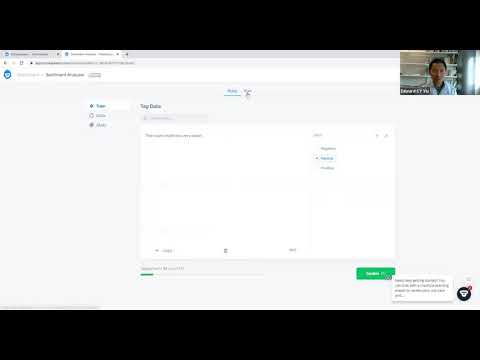
The product offered prebuilt models for common jobs and custom models trained from a team's own examples. Its value was not simply natural language processing. The differentiator was the packaging: a browser interface for training and visual analysis, plus an API that let developers run the resulting model inside a workflow. Google Sheets, CSV and spreadsheet-oriented use cases made it useful to business analysts as well as technical teams.
That model-training workflow required work from the user. A custom classifier is only as coherent as its label system and examples. If one reviewer called a message billing and another called the same kind of message account problem, the model learned the inconsistency. Teams needed enough representative text, clear category definitions and a review process for uncertain predictions. MonkeyLearn simplified machine learning, but it did not remove the need to design the problem well.
Why the acquisition changes this page
An acquired tool can remain available under its old brand, become a feature inside the buyer's platform, or disappear as a standalone service while its team and technology move elsewhere. MonkeyLearn now fits the third description most closely from the public evidence. The domain no longer presents the MonkeyLearn product. Its LinkedIn company page calls the company former, archived and no longer active. The old brand's public pricing and documentation are not the current commercial surface.
Medallia is a much broader product. It collects experience signals from surveys, calls, chats, reviews, digital journeys and operational systems, then applies analytics and workflows across customer and employee programs. Text analytics is one layer within that enterprise environment, not a lightweight replacement page where someone can sign up for the same MonkeyLearn account.
That distinction protects buyers from two common mistakes. The first is repeating obsolete MonkeyLearn prices as if they are available today. The second is describing every Medallia text feature as a renamed MonkeyLearn capability. An acquisition can influence technology and talent without providing a one-to-one feature map. Unless Medallia explicitly documents that map, the responsible comparison is between the historical MonkeyLearn workflow and the current Medallia offer, not an assertion that one has simply become the other.
What Medallia offers now
Medallia Text Analytics analyzes unstructured customer and employee feedback across channels. The current product page emphasizes themes, sentiment, empathy, emotion and intent, along with prebuilt and customizable topic models. It can surface emerging trends, trigger alerts, prioritize tickets, support agent scoring and feed workflows. The platform is designed for scale and for teams acting on experience data, rather than for an individual experimenting with one small CSV.
Generative AI has changed the presentation too. Medallia now promotes Themes with GenAI, Intelligent Summaries, Root Cause Assist and Smart Response as parts of its Frontline-Ready AI direction. Themes can surface patterns without a manual tagging project. Intelligent Summaries compress conversations and feedback. Root Cause Assist investigates drivers behind a score or change. Smart Response helps customer-facing teams draft personalized replies.
These features address some of the same business questions that brought users to MonkeyLearn: what are customers talking about, how do they feel, why is a metric moving and what should the team do next? The delivery is different. MonkeyLearn gave users a flexible model-building workbench. Medallia wraps text intelligence inside a governed experience-management program with feedback collection, profiles, reporting, routing and action.
Pricing is now a conversation, not a checkout
There is no verified current MonkeyLearn price because there is no public standalone MonkeyLearn offer. The historical free and paid tiers should be treated as expired information.
Medallia does not publish a simple monthly figure for Text Analytics. Its public pricing page describes an Experience Data Record, or EDR, model. An EDR includes data associated with a distinct customer or employee interaction, and the pricing framework covers incoming experience data, analytics, workflows, security and self-service capabilities. Actual costs require a quote based on program scope.
That means a buyer should arrive with volumes and boundaries. Estimate surveys, reviews, conversations, calls, chats and other interactions by channel and region. Clarify whether historical data is imported, how duplicates are counted, which analytics modules are included and how data growth affects renewal. Ask about implementation, services, language support, environments, retention, APIs and premium AI features.
For a small team looking for the old MonkeyLearn experience, this enterprise pricing model may be a mismatch. Current text-analysis vendors, general AI APIs and feedback-analysis tools may offer a lighter entry point. Medallia becomes more relevant when text analysis is one component of a larger customer-experience or employee-experience program and the organization needs governance, scale, routing and role-based action.
What former MonkeyLearn users should do
Do not wait for a broken workflow to answer the product-status question. Inventory every place that depends on MonkeyLearn, including API calls, automation connectors, spreadsheets, dashboards and scheduled jobs. Record the model IDs, labels, extraction fields, confidence thresholds, usage volumes and downstream actions. Confirm whether requests still succeed and who owns the current commercial agreement.
Export what is available. Keep training examples, label definitions, test sets, prediction logs and any results the business needs to retain. A trained model is useful, but the human work around it is often more valuable: the taxonomy, edge cases and adjudicated examples explain what the organization meant by each label. Those assets make migration much easier.
Contact Medallia for an authoritative answer about continued access, support and migration. Public redirection proves that MonkeyLearn is not marketed independently, but it does not reveal the terms of every existing customer's environment. Ask for dates and commitments in writing. If access is ending, request export formats, deletion timing and any assistance available for transition.
Then run a replacement evaluation using the original test set. Do not compare tools only by whether they have sentiment analysis. Feed each candidate the same representative messages and score label quality, extraction accuracy, latency, explainability, language support, cost and operational fit. Include difficult examples, short messages, mixed topics, sarcasm, product names and text from periods not represented in the original training set.
Choosing a replacement by job, not nostalgia
The best replacement depends on what MonkeyLearn was doing for the team. If the goal is an enterprise voice-of-customer program across surveys, calls, chats and digital signals, Medallia is the natural place to start. It can connect text analytics with broader profiles, workflows and frontline action. The tradeoff is enterprise scope and commercial complexity.
If the goal is focused customer-feedback analysis, products such as Thematic, SentiSum or Idiomatic may offer opinion mining, topic discovery and dashboards without requiring the organization to assemble a full experience platform. Evaluate channel coverage, taxonomy control, natural-language querying, integrations and the amount of vendor service involved in setup.
If the goal is a developer API for classification or extraction, general language-model APIs and specialist NLP services may be closer to the old MonkeyLearn architecture. A developer can define a schema, classify batches and return structured output. The apparent simplicity hides new responsibilities: prompt and model versioning, evaluation, privacy, token cost, rate limits and output validation.
If the goal is support-ticket routing, start with the helpdesk. Modern support platforms increasingly include native intent, sentiment and categorization features. A built-in model may be less customizable than MonkeyLearn, but it can eliminate an integration and keep routing logic closer to the system where agents work.
The labels are the real migration asset
MonkeyLearn encouraged teams to create custom categories, and those taxonomies often became embedded in reporting and operations. A migration is a chance to decide whether the labels still describe the business.
Begin with definitions. Every label should explain what belongs, what does not belong and how to handle overlap. Merge categories that nobody can distinguish reliably. Split categories only when the distinction leads to a different decision. Create a fallback for genuinely unclear text instead of forcing every example into a confident bucket.
Use multiple reviewers for a sample and measure agreement. If people consistently disagree, a new model will not fix the underlying ambiguity. Resolve those cases, update the guide and preserve the adjudicated examples. When a new system produces a different result, reviewers can trace the disagreement to a known rule rather than debating from memory.
Keep business actions separate from model labels. A text may be classified as cancellation risk, but the correct action can depend on account value, region, contract status and previous contact. The analytics model should produce evidence and confidence. A workflow layer should apply operational rules and approvals. Combining the two invisibly makes errors difficult to diagnose.
Sentiment is useful, but rarely sufficient
MonkeyLearn became well known for accessible sentiment analysis, and sentiment remains a common entry point. It can show whether feedback is broadly positive or negative and help teams prioritize review. It cannot explain the business on its own.
A negative message about price is different from a negative message about safety. A positive statement about one feature can sit beside a cancellation request. Sarcasm, regional phrasing and industry language can invert a generic model's reading. Aggregate sentiment can also improve while a small but valuable segment deteriorates.
Pair sentiment with topics, intent, effort, customer attributes and outcome data. Review changes at segment level and inspect the source text behind a trend. Current Medallia materials emphasize themes, emotion, empathy, intent and customizable KPIs for this reason. The useful question is not simply whether customers sound happier. It is which pattern moved, for whom, why it matters and which team can act.
Human review belongs in the operating model
Text analytics turns thousands of comments into a manageable structure, but the structure is an interpretation. Maintain a review queue for low-confidence, novel or high-consequence items. Sample apparently confident predictions too, because confidence is not proof of correctness.
Track drift. Product launches, policy changes, new competitors and seasonal events can introduce language that the original model never saw. A classifier can continue returning familiar labels while missing the new meaning. Monitor unknown terms, category distribution and disagreement with human reviewers. Revalidate after major changes to source channels or model versions.
For generative summaries and root-cause explanations, keep links to underlying evidence. A concise narrative can be persuasive even when it omits a minority view or confuses correlation with cause. Analysts should be able to move from the summary to the comments, calls, segments and calculations that support it.
Privacy and governance have become more important
Customer feedback can contain names, contact details, health information, payment problems, employee complaints and sensitive free text. Before moving data from MonkeyLearn or adopting a successor, classify the data and decide what should be redacted. Do not send an entire historical export to a new service simply because it is convenient.
Medallia publishes enterprise data-protection and security information, including ISO 27001, SOC 2 and FedRAMP Ready references. Its data-protection page says customer reporting data is retained until a client deletes it or ends the relationship, while personal data in internal processing systems is purged according to minimization practices. Buyers still need the applicable agreement, deployment details, subprocessor list and retention configuration for their program.
For any alternative, ask whether customer text is used for model training, where it is processed, how long prompts and outputs are retained, who can access them and how deletion works. Confirm regional hosting, access controls, audit logs, encryption and incident notification. If an external language model is involved, identify the provider and contractual data path.
The category remains Analytics
MonkeyLearn belongs in Analytics because its historical function was to analyze and structure text. The acquisition and domain redirect change availability, not the nature of the product users remember. Within the category, the page should be clearly marked as a former standalone product whose active successor context is Medallia Text Analytics.
Keeping a page like this can still serve readers. People search for old tools when an API fails, a tutorial references a vanished screen or a procurement document contains an obsolete subscription. A useful directory should not pretend the product is live, but it should explain what it did, what happened, where the domain now leads and how to choose a responsible next step.
The WhatAI verdict
MonkeyLearn was an important no-code text-analysis product, but it should not be recommended in 2026 as a current free or self-serve tool. Medallia acquired the company in 2022, the company profile is archived, and the domain now resolves to Medallia. Public standalone pricing is gone.
Former users should preserve their taxonomies and test data, confirm account status with Medallia and evaluate replacements against real examples. New buyers should start with the job: Medallia for enterprise experience analytics, a focused feedback platform for voice-of-customer analysis, a current API for developer-controlled classification, or native helpdesk intelligence for ticket workflows.
MonkeyLearn's lasting lesson is still useful. Making text analysis approachable is only half the work. The durable value comes from clear labels, representative data, honest evaluation and a process that turns uncertain predictions into careful action.
MonkeyLearn was a no-code text-analysis platform for sentiment, classification, extraction, custom NLP models, visual analysis, and API workflows. Medallia acquired the company in 2022, its former company profile is archived, and the MonkeyLearn domain now resolves to Medallia.
What Happened to MonkeyLearn
There is no verified current standalone MonkeyLearn pricing or self-serve product offer. Medallia now provides enterprise text analytics inside its experience platform using custom Experience Data Record pricing. Existing users should confirm support and migration directly with Medallia.
Best MonkeyLearn Replacement Paths
Choose by job: Medallia for enterprise experience analytics, a focused feedback platform for voice-of-customer work, a current language-model or NLP API for developer workflows, or native helpdesk AI for ticket classification. Test every candidate on the same representative labeled data.
About MonkeyLearn
MonkeyLearn was a no-code text-analysis platform for classification, extraction, sentiment analysis, topic tagging, and custom machine-learning models. Medallia acquired MonkeyLearn in 2022, the former company profile is archived, and monkeylearn.com now resolves to Medallia. MonkeyLearn is no longer marketed as a standalone self-serve product. Current buyers should evaluate Medallia Text Analytics or an active alternative.
Use Cases
Key Features
- ✓ Custom text classification
- ✓ Entity and keyword extraction
- ✓ Sentiment analysis
- ✓ Topic and intent tagging
- ✓ Browser model training
- ✓ Text-analysis API
- ✓ Spreadsheet data imports
- ✓ Visual analytics dashboards
- ✓ Prebuilt NLP models
- ✓ Confidence-based predictions
Pricing
MonkeyLearn Standalone
Unavailable
- • No current standalone plans
- • Historical pricing has expired
Medallia Text Analytics
Custom quote
- • Experience Data Record pricing
- • Enterprise platform access
- • Contact Medallia sales
Pricing varies by plan and region — see current pricing.
Plan features change — last updated: 2026-08-24.
Details
Tags
MonkeyLearn Community Discussions
Explore community discussions. Ask and answer questions on MonkeyLearn to grow and learn together.
MonkeyLearn Showcase
MonkeyLearn — Frequently Asked Questions
Is MonkeyLearn still available?
MonkeyLearn is no longer publicly marketed as a standalone product. Its domain resolves to Medallia, and the former MonkeyLearn company profile is archived and marked inactive.
What happened to MonkeyLearn?
Medallia acquired MonkeyLearn in February 2022 to expand its AI and text-analysis capabilities. MonkeyLearn later ceased operating as an independently marketed product.
Is MonkeyLearn free?
There is no verified current MonkeyLearn free plan. Old free and paid tier information is historical and should not be used for a new buying decision.
How much does MonkeyLearn cost now?
Standalone MonkeyLearn pricing is unavailable. Medallia uses custom Experience Data Record pricing for its broader enterprise experience and analytics platform.
Does the MonkeyLearn API still work?
Public evidence does not establish ongoing standalone API availability for every account. Existing users should test their calls, export assets, and request written status information from Medallia.
What did MonkeyLearn do?
MonkeyLearn let teams train text classifiers and extractors, run sentiment and topic analysis, visualize results, and process text through a browser interface or API.
What is the closest successor?
Medallia Text Analytics is the corporate successor context, but it is a broader enterprise platform rather than a direct self-serve replacement for the old MonkeyLearn studio.
What should former users export?
Preserve training examples, label definitions, model identifiers, test sets, thresholds, prediction logs, API mappings, and any business-critical results before changing systems.
What are good MonkeyLearn alternatives?
The best option depends on the job. Compare Medallia, focused feedback tools such as Thematic or SentiSum, current NLP APIs, and native helpdesk classification using the same labeled test set.
Sources & References
Try MonkeyLearn
Visit the official website to get started with MonkeyLearn today.
Visit MonkeyLearn →